 Gearfuse Technology, Science, Culture & More
If you’ve ever sat down to trim your Instagram following list and watched the app suddenly refuse to let you unfollow anyone, you’ve run into one of the platform’s least-talked-about quirks: Instagram actively monitors how quickly and how often you unfollow accounts, and it will temporarily block the action if your behavior looks automated. This is frustrating for anyone doing a legitimate cleanup, whether you’re clearing out an old follow-for-follow list, tidying up a business account, or simply reclaiming a feed that’s drifted away from what you actually care about.
The good news is that unfollowing safely isn’t complicated once you understand what triggers Instagram’s spam detection in the first place. Below are five proven methods, ranging from fully manual to lightly assisted, along with the pacing and behavior guidelines that keep your account in good standing.
Why Instagram Flags Unfollow Activity
Instagram’s automated systems are built to catch bot-like behavior, and mass unfollowing is one of the clearest signals they watch for. The platform doesn’t publish exact numbers, but based on consistent user reports and long-standing community consensus, accounts that unfollow more than roughly 150–200 people in a single day, or that unfollow in rapid, evenly-spaced bursts (a telltale sign of automation), are the ones most likely to trip a temporary action block.
Newer accounts, accounts with low follower counts relative to following counts, and accounts that have recently followed a large number of people are held to a stricter threshold. If you’ve been using third-party growth tools in the past, your account may already be sitting closer to that limit than you’d expect, even if you haven’t personally unfollowed anyone recently.
The warning signs are usually easy to spot: an “Action Blocked” message, a vague “Try Again Later” prompt when tapping the Following button, or unfollow taps that simply don’t register. Once you see any of these, the safest move is to stop unfollowing entirely for at least 24–48 hours rather than continuing to test the limit.
What Does “Instagram User” Mean? [Indepth Guide]
Method 1: Manual Unfollowing Through the App
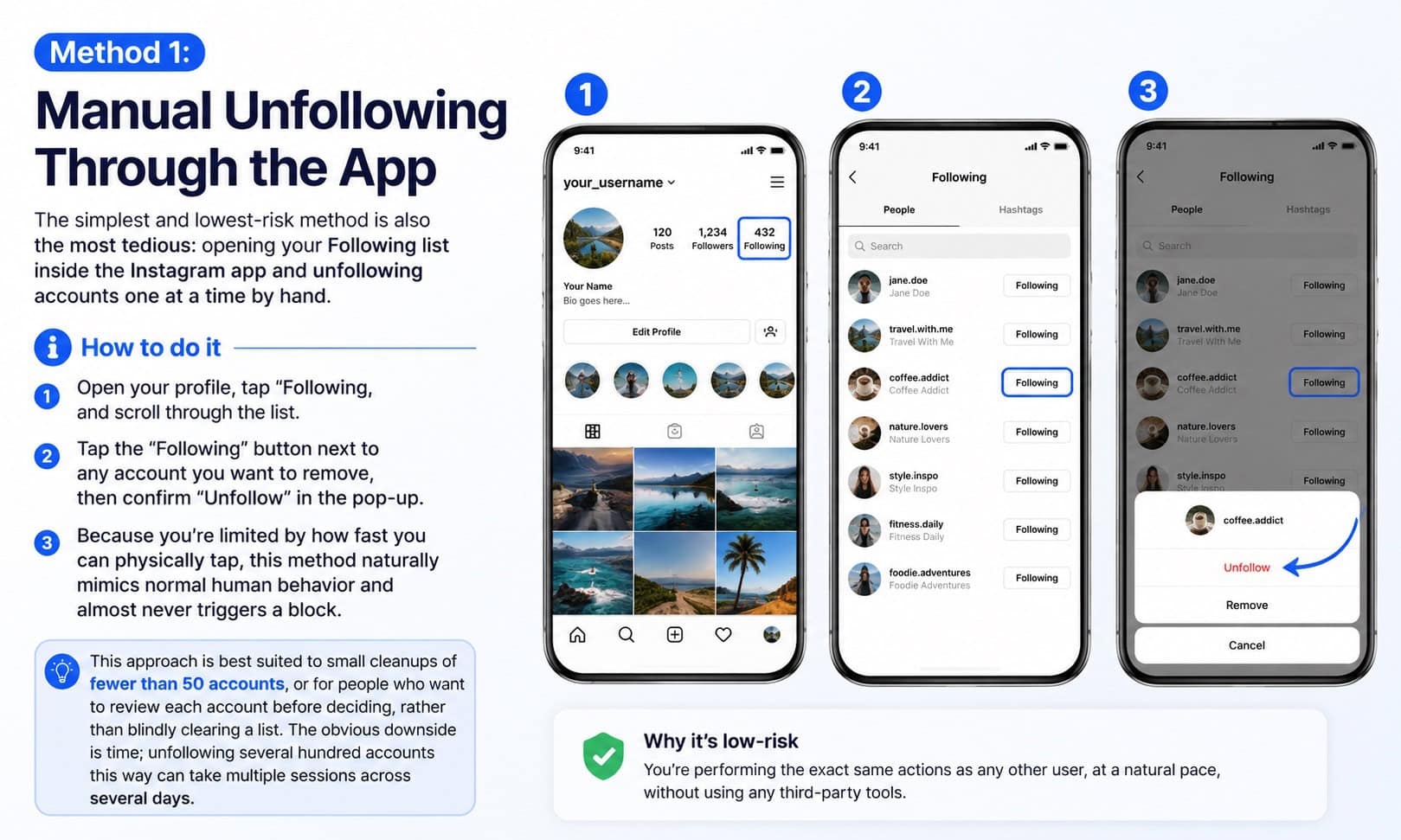
The simplest and lowest-risk method is also the most tedious: opening your Following list inside the Instagram app and unfollowing accounts one at a time by hand.
How to do it
Open your profile, tap “Following,” and scroll through the list. Tap the “Following” button next to any account you want to remove, then confirm “Unfollow” in the pop-up. Because you’re limited by how fast you can physically tap, this method naturally mimics normal human behavior and almost never triggers a block.
This approach is best suited to small cleanups of fewer than 50 accounts, or for people who want to review each account before deciding, rather than blindly clearing a list. The obvious downside is time; unfollowing several hundred accounts this way can take multiple sessions across several days.
Method 2: Sorting Your Following List Strategically
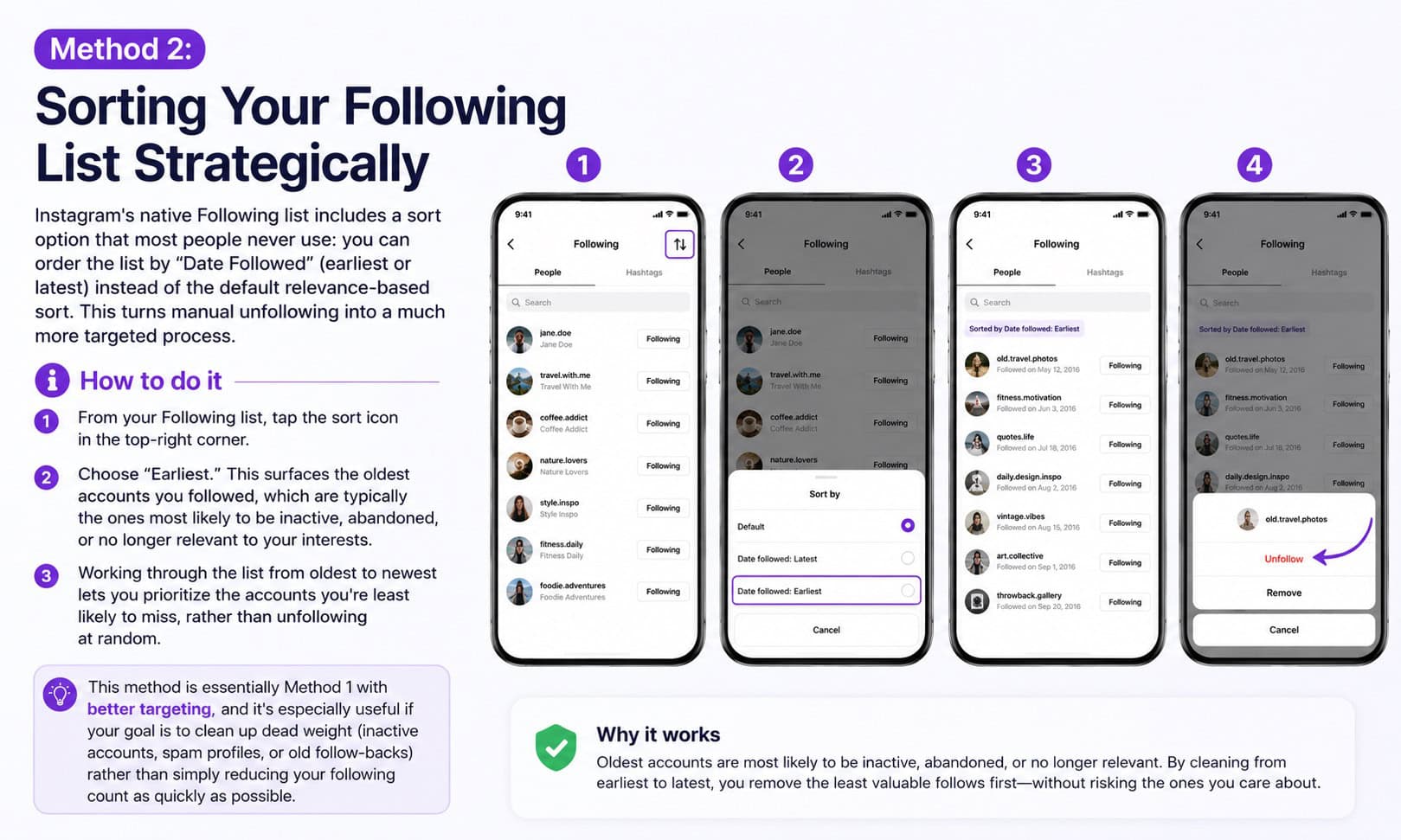
Instagram’s native Following list includes a sort option that most people never use: you can order the list by “Date Followed” (earliest or latest) instead of the default relevance-based sort. This turns manual unfollowing into a much more targeted process.
How to do it
From your Following list, tap the sort icon in the top-right corner and choose “Earliest.” This surfaces the oldest accounts you followed, which are typically the ones most likely to be inactive, abandoned, or no longer relevant to your interests. Working through the list from oldest to newest lets you prioritize the accounts you’re least likely to miss, rather than unfollowing at random.
This method is essentially Method 1 with better targeting, and it’s especially useful if your goal is to clean up dead weight (inactive accounts, spam profiles, or old follow-backs) rather than simply reducing your following count as quickly as possible.
SPWM Meaning on Texting & Instagram Explained
Method 3: Third-Party Unfollow Tracker Apps
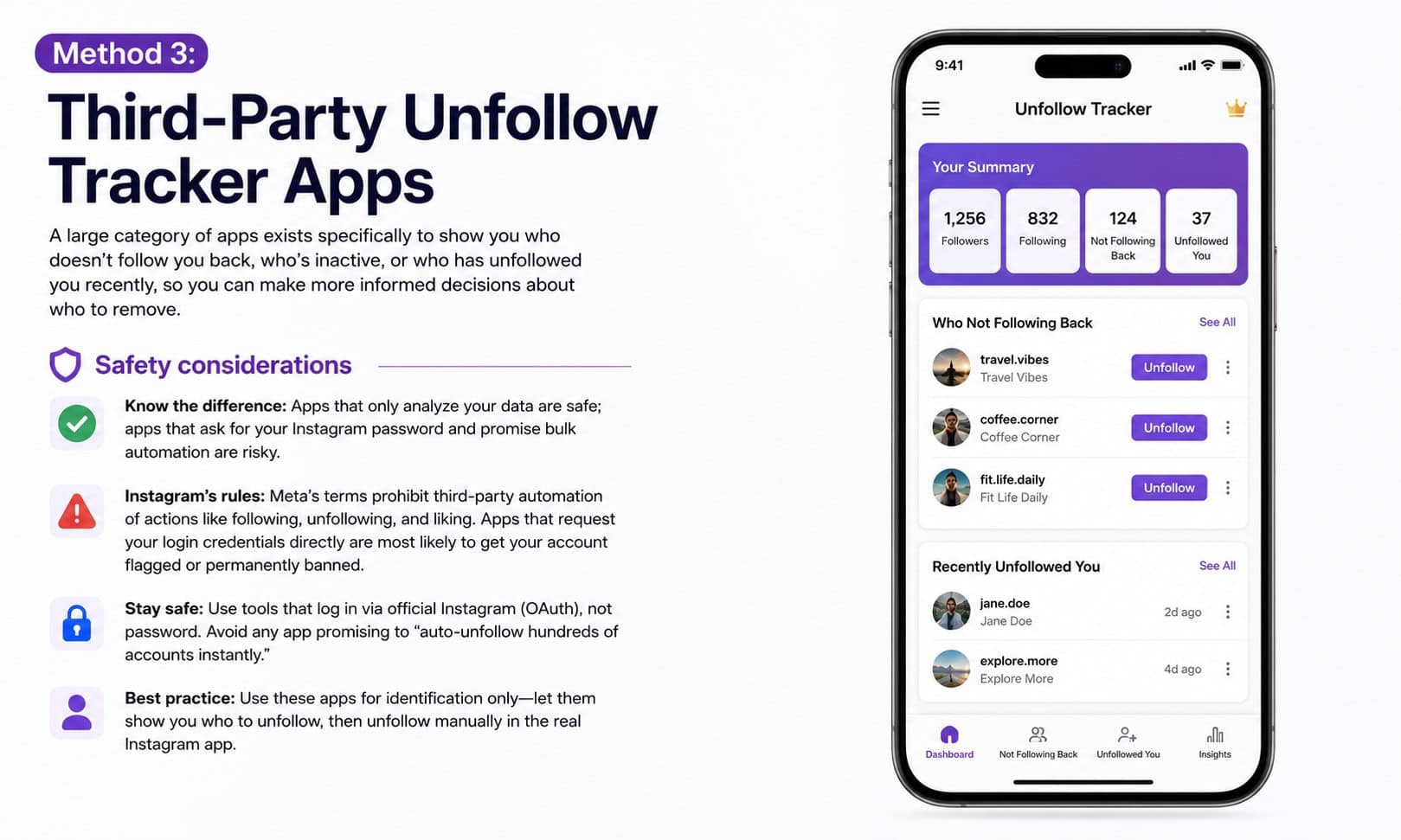
A large category of apps exists specifically to show you who doesn’t follow you back, who’s inactive, or who has unfollowed you recently, so you can make more informed decisions about who to remove. These are typically analytics-style apps available on the App Store and Google Play that focus on identification rather than automated action.
Safety considerations
The important distinction here is between apps that only analyze your follower/following data (safe) and apps that ask for your Instagram password to perform bulk automated actions on your behalf (risky). Meta’s terms of service explicitly prohibit third-party automation of actions like following, unfollowing, and liking, and apps that request your login credentials directly, rather than using Instagram’s official API and OAuth login, are the ones most likely to get an account flagged or permanently banned.
Stick to tools that use official Instagram login (OAuth) rather than asking you to type your password into a third-party form, and treat any app promising to “auto-unfollow hundreds of accounts instantly” as a red flag rather than a shortcut. The safest use of these tools is for identification only: let the app show you who to unfollow, then perform the unfollow yourself inside the real Instagram app.
Method 4: Browser Extensions With Manual Confirmation
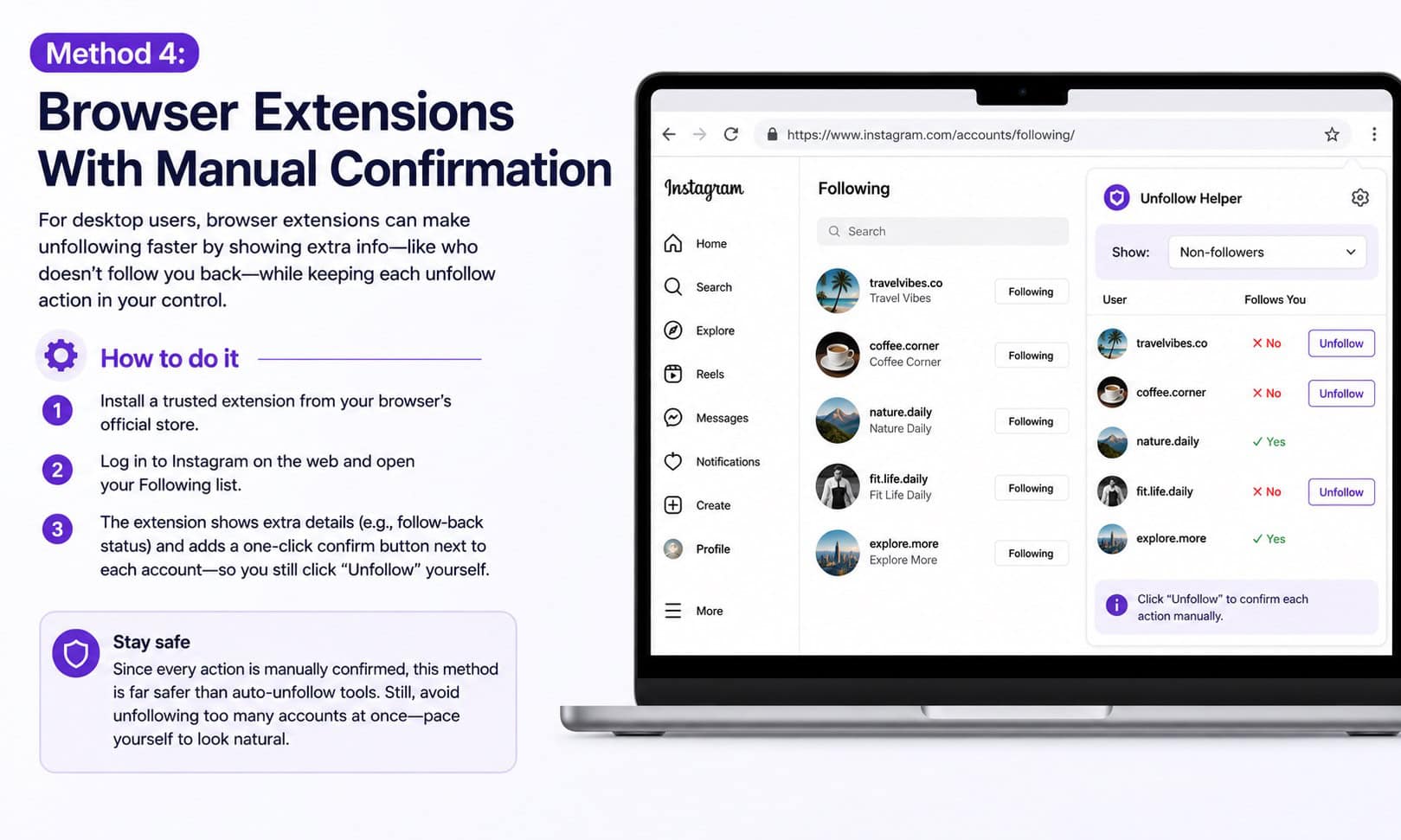
For desktop users, a handful of browser extensions add convenience features to Instagram’s web interface, such as highlighting non-followers or adding a one-click confirm button next to each account in your list. The key safety feature to look for is that these extensions should require you to manually click or confirm each individual unfollow action, rather than running the process automatically in the background.
How to do it
Install a reputable extension from your browser’s official store, log into Instagram through the web (not the extension itself), and navigate to your Following list. The extension typically overlays additional information, such as follow-back status, next to each account, letting you make faster decisions while still physically clicking through each unfollow yourself.
Because the action is still manually triggered by a human click, this sits in a gray area that’s considerably safer than full automation, but it’s still worth pacing yourself rather than clicking through hundreds of accounts in one uninterrupted session.
Picuki: A Comprehensive Guide to Instagram Story and Post Viewer
Method 5: Gradual Scheduled Unfollowing (Pacing Strategy)
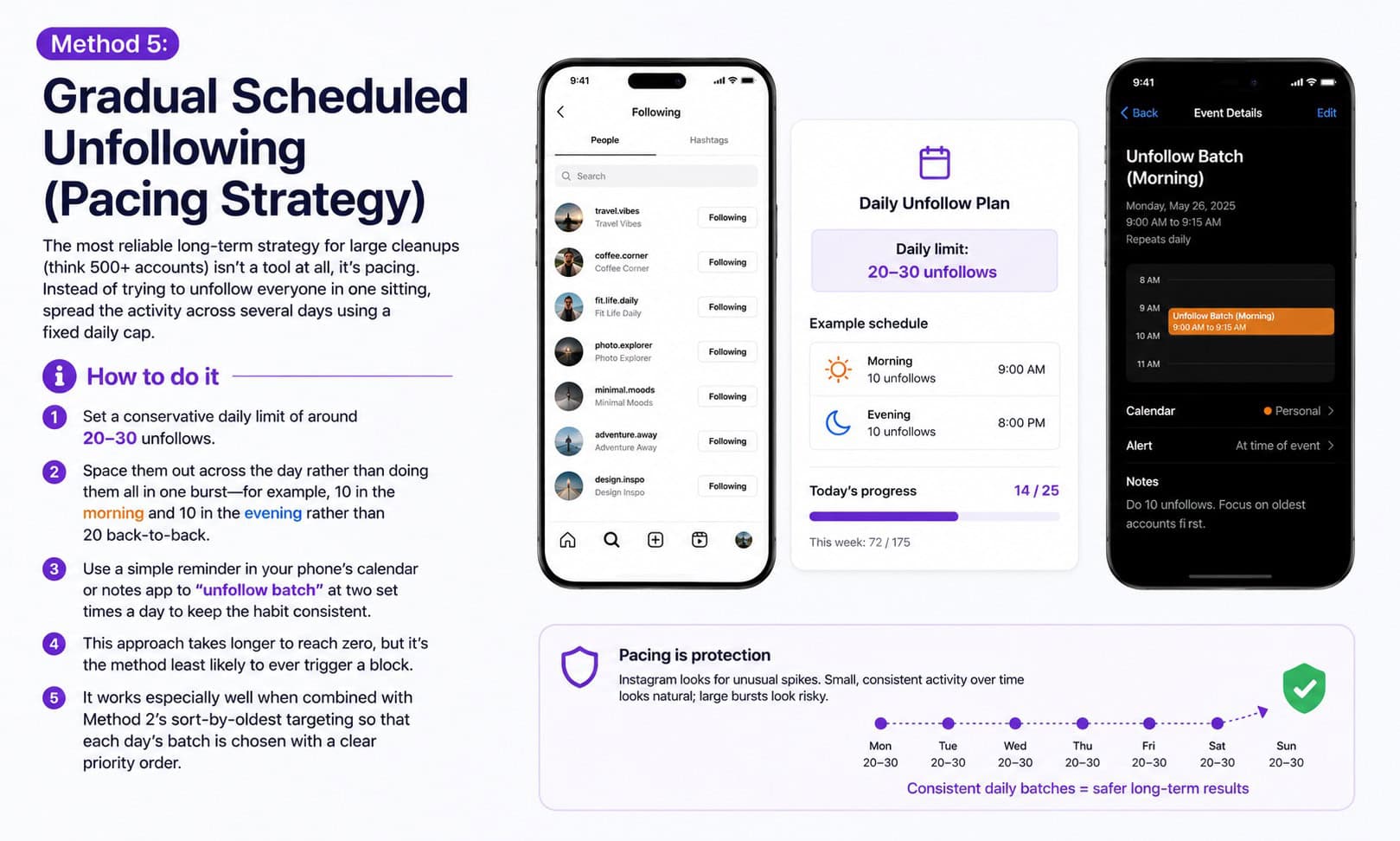
The most reliable long-term strategy for large cleanups (think 500+ accounts) isn’t a tool at all, it’s pacing. Instead of trying to unfollow everyone in one sitting, spread the activity across several days using a fixed daily cap.
How to do it
Set a conservative daily limit of around 20–30 unfollows, and space them out across the day rather than doing them all in one burst, for example 10 in the morning and 10 in the evening rather than 20 back-to-back. Using a simple reminder in your phone’s calendar or notes app to “unfollow batch” at two set times a day helps keep the habit consistent without becoming another automated pattern in itself.
This approach takes longer to reach zero, but it’s the method least likely to ever trigger a block, and it works well combined with Method 2’s sort-by-oldest targeting so that each day’s batch is chosen with a clear priority order.
Best Practices to Avoid Action Blocks
A few habits apply across all five methods and meaningfully reduce your risk of getting flagged, regardless of which one you use.
Keep daily unfollows under roughly 150, and well under that if your account is new or has previously used automation tools. Avoid combining high-volume unfollowing with other bulk actions, such as following many new accounts or liking large numbers of posts, on the same day. Vary the timing between actions rather than unfollowing at a perfectly even interval, since consistent timing is itself a signal of automation. And if you ever see a warning message or notice unfollow taps aren’t registering, stop immediately and wait at least 24–48 hours before trying again.
What to Do If You Get Action Blocked
If Instagram does temporarily restrict your account, the fix is almost always patience rather than troubleshooting. Action blocks typically last anywhere from a few hours to 48 hours, occasionally longer for repeat triggers. Stop all unfollow activity immediately, avoid using any third-party tools during this period, and use the account normally (posting, commenting, browsing) without attempting further follow or unfollow actions until the restriction lifts on its own.
Once the block clears, resume at a noticeably slower pace than before, ideally cutting your previous daily unfollow count by half for at least a week, since repeated blocks in a short window can lead to longer restrictions.
Iganony: The Ultimate Guide to Anonymous Instagram Content Viewing
Frequently Asked Questions
Is it safe to unfollow 100 people at once?
Unfollowing 100 accounts in a single day is generally within Instagram’s tolerance for an established account, but doing it in one rapid, uninterrupted burst raises more risk than spreading the same 100 unfollows across a few hours or a couple of days.
Does Instagram notify people when you unfollow them?
No. Instagram does not send a notification when you unfollow someone. The only way another user would notice is by manually checking their followers list or using a third-party tracking app themselves.
How many unfollows per day is safe in 2026?
Based on consistent community reporting, staying under 150 unfollows per day for established accounts, and closer to 50–75 for newer or smaller accounts, is a reasonable safety margin. Pacing those actions throughout the day rather than in one burst matters as much as the total count.
Can third-party apps get my account banned?
Yes, specifically apps that request your Instagram password directly and perform automated bulk actions on your behalf. Apps that only analyze your follower data through official login methods, without taking automated actions, carry substantially lower risk.
Conclusion
There’s no single “best” way to unfollow on Instagram safely; the right method depends on how many accounts you’re clearing and how much time you’re willing to spend. The table below compares all five approaches at a glance.
| Method | Speed | Safety Level | Effort Required |
| Manual (in-app) | Slow | Very High | High |
| Sort by oldest | Slow-Medium | Very High | Medium |
| Third-party trackers (ID only) | Medium | High | Low-Medium |
| Browser extension (manual confirm) | Medium | Medium-High | Low |
| Gradual scheduled pacing | Slow (multi-day) | Highest | Low (habitual) |
For most people, the winning combination is Method 2 (sort by oldest) to prioritize targets, paired with Method 5’s pacing strategy to spread the work across several days. It’s slower than any automated tool, but it’s also the version of “safely” that actually holds up over time.