Gearfuse Technology, Science, Culture & More
Terabox promises 1TB of free cloud storage, sounds too good to be true, right? Plus, it ensures complete data protection and up-to-date encryption. But is it okay to just hand over your data without diligence?
What Is Terabox? And Why Is It Getting Popular?
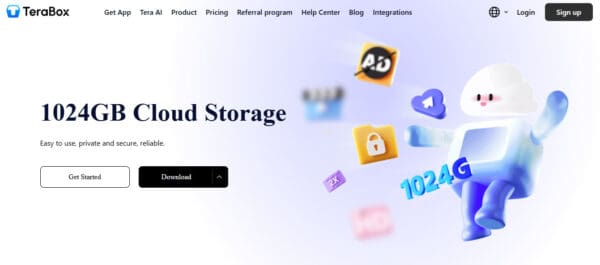
Terabox is a cloud storage service that gives at least 1TB (1,024 GB) of free storage. That gives you plenty of room for countless photos, videos, and documents. It operates similarly to Google Drive or Dropbox, where you can upload your files to the cloud and access them anytime, from any device.
Plus, it has no upfront fees, or any other hidden charges. It also automatically backs up your files, supports video playback, and even provides tools to handle large files more effectively.
However many users have started to doubt its security measures, especially considering it’s owned by a company based in Asia.
Who Owns Terabox? And Is It Trustworthy?
Terabox is a brainchild of Flextech Inc., a tech company based in Tokyo that handles everything from its development to its servers and operations. While many people mistakenly think it’s a Chinese product, partly because it used to be called Dubox, Terabox is actually from Japan. Interestingly, Chinese investment was reportedly pulled back during its restructuring in 2024. Flextech is also certified with ISO/IEC 27001, 27018, and 27701 which highlights its commitment to international data security standards.
Your data is securely stored on Japanese servers. And worry not as it is protected under the country’s robust privacy laws (APPI), which are similar to the GDPR in Europe.
However, there are users that still worry about a potential “China backend” or connections to Chinese code, given its origins in Asia.
So, if you’re handling particularly sensitive or confidential information, we recommend adding your own layer of encryption before uploading or using a service that offers zero-knowledge encryption.
Is Terabox Safe to Use? A Deep Dive into Security. And How To Layer It With Your Own Encryption?

Let’s start with its complete security breakdown.
At first glance, Terabox does have some basic security measures in place. It uses HTTPS to secure the connection between your device and its servers, this helps keep your files safe from interception while they’re being transferred. Plus, all the logins are protected by passwords, and the service adheres to ISO/IEC security standards like 27001 and 27701 with a strong focus on data handling and privacy.
That said, Terabox falls short when it comes to end-to-end encryption. This means that while your data is secure during transfer and on their servers, it could still be accessed by the company’s internal systems. This is definitely a concern for those who store sensitive information, such as tax documents, ID scans, or business contracts.
Another issue is that your data goes straight to another country’s server. Although it is in Japan, it is owned by Flextech Inc. It still has historical connections to Chinese cloud services. This should raise some eyebrows, especially considering China’s track record with digital surveillance. Even with Japan’s stronger privacy laws, there’s still a bit of uncertainty about how data is managed behind the scenes.
Also Read: Paragraph-generator.com Review & Top 9 Alternatives
How To Make Terabox Safer With Your Own Encryption?
Before you upload anything, make sure to use encryption software!
You can use tools like 7-Zip, VeraCrypt, or AxCrypt to help you encrypt your files or even entire folders right on your device before you send them off to Terabox. And Don’t forget to pick strong passwords and opt for AES-256 encryption if it’s an option.
Next one includes creating password-protected archives so you can compress and encrypt your files into a .zip or .rar archive with a password. This way, even if someone manages to access your files on Terabox, they’ll still be locked up tight. Plus, be clear of Uploading Highly Sensitive Files.
If you’re dealing with super confidential information, it’s best to stick with services like Tresorit or Proton Drive, which provide genuine encryption.
And lastly, don’t forget to enable 2FA (If It’s Available). Always turn on two-factor authentication to help protect your account from breaches.
What Are Terabox’s Privacy Policy & Data Collection Practices?
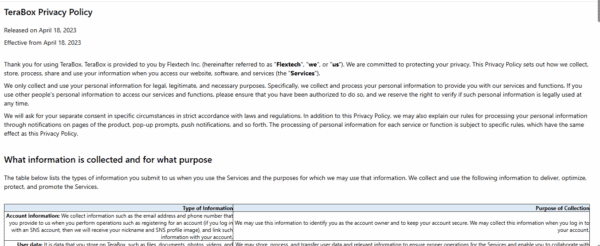
What Terabox Collects?
When you sign up or use Terabox, they collect some personal information like your name, email, phone number, and payment details. They also gather usage and device data, which includes your IP address, the type of device or browser you’re using, clipboard activity, and how you interact with our service like what you upload, download, and how you use the app.
Additionally, they use cookies and tracking to enhance functionality to personalize experience etc.
How Terabox Uses & Shares Data?
The main purpose of their service is to provide, maintain, and improve your experience. They also send updates, support responses, and promotional content to keep you informed. With such policies, they assure you that they don’t sell or rent your personal data. However, they can share it with trusted third-party service providers, like storage partners and analytics companies, who are legally obligated to keep your information safe.
Security Measures & User Rights
- It implements SSL/TLS encryption and holds ISO 27001/27018/27701 certifications.
- It also supports user rights such as access, correction, deletion, and opting out of communications, all while ensuring more internal control under GDPR.
Pollo.ai Review: Free AI Image Generator That Brings Ideas to Life
Is Terabox Safe For Sensitive Files?
When it comes to storing highly sensitive files like passports, ID cards, tax documents, or legal contracts Terabox is not your best bet.
Sure, Terabox does use basic encryption during file transfers and has some international certifications, like ISO 27001, but it falls short on end-to-end encryption. This means that your files are decrypted and stored in a way that anyone with access to their backend could potentially see your data.
For everyday use, like backing up photos, videos, or non-confidential documents, Terabox works just fine. However, if you’re dealing with personal or financial information, the risks can be a bit concerning. Plus, the free storage model is ad-supported, which raises questions about how your data is shared with third parties.
If you really need to use Terabox for sensitive files, it’s a good idea to encrypt them yourself first(like we have already told you above!).
User Reviews Of Different Forums 2025
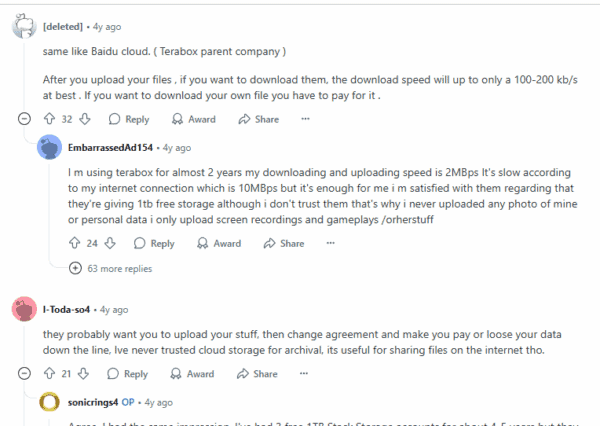
Reddit Feedback (r/cloudstorage, r/DataHoarder)
Many users on Reddit found that downloads were pretty slow on the free plan, but they managed by encrypting their files and keeping backups in other places. Another user shared a similar sense of cautious optimism. However, there’s a bit of concern; some users worry that since it’s a free service from a relatively new company, it might just vanish one day. And while others have noted some upload issues: when trying to upload large files that aren’t media or are encrypted through the browser, it sometimes doesn’t work, probably because of file-type restrictions or limitations of the plan.
FAQs
Is Terabox really free to use?
Absolutely! Terabox offers a free plan that gives you 1TB of storage. Just keep in mind that the free version comes with some ads, slower download speeds, and a few restrictions on the types and sizes of files you can upload. If you want to enjoy faster uploads, support for larger files, and an ad-free experience, you can always opt for a premium plan.
Can Terabox staff access my files?
In short, yes. Since Terabox doesn’t provide end-to-end encryption, your files are stored in a format that can be read on their servers. This means that staff or systems with backend access can see your data, so it’s best not to store anything too sensitive there.
Has Terabox ever been hacked?
As of 2025, there haven’t been any major hacks or public data breaches reported involving Terabox. However, just like with any cloud service, there’s always a bit of risk. It’s a good idea to take extra precautions by encrypting any sensitive files before you upload them.
Final Conclusion: Should You Use It Or Not?
If you’re on the hunt for a generous amount of free storage to back up non-sensitive files like photos, videos, or everyday documents, Terabox is definitely worth it. It has a user-friendly interface and standard data encryption practices. However, if you’re dealing with confidential or highly sensitive information, it’s wise to either encrypt your files before uploading them or opt for a service that provides end-to-end encryption.