 Gearfuse Technology, Science, Culture & More
A 65-inch TV is about 57 inches (145 cm) wide and 33 inches (84 cm) tall without its stand. The “65 inches” is the screen’s diagonal, measured from one corner to the opposite corner, not its width. Exact sizes change a little from model to model, but almost every current 65-inch TV is between 56.7 and 57.5 inches wide.
| Inches | Centimetres | |
|---|---|---|
| Width | 56.7–57.5 | 144–146 |
| Height (no stand) | 32.5–33.5 | 83–85 |
| Height (with stand) | 34.5–36 | 87–91 |
| Depth (no stand) | 1–3 | 2.5–8 |
| Depth (with stand) | 10–14 | 26–35 |
If you only needed the number, that’s it. If you’re trying to work out whether 65-inch tv size will actually fit on your wall, in your alcove or on your TV unit, read on. The width is the easy part. The stand and the depth are where people get caught out.
Why a 65-inch TV isn’t 65 inches wide
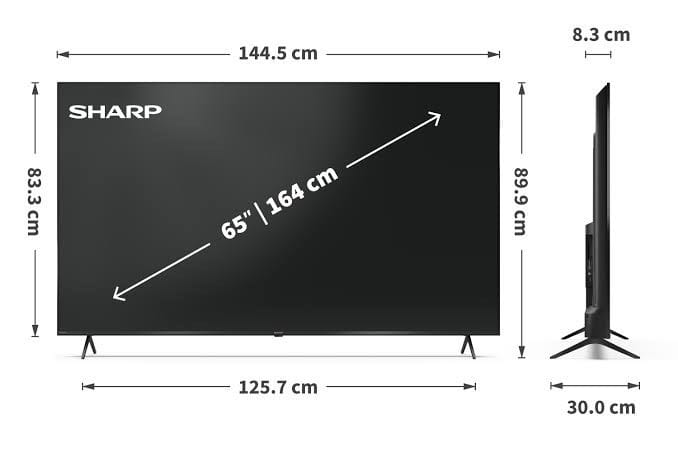
TV sizes have always been quoted by the diagonal. It’s an old habit from the days of round-cornered tubes, and the industry never changed it, partly because a bigger number looks better on the box.
Almost every TV sold today has a 16:9 screen, meaning it’s 16 units wide for every 9 units tall. Run a 65-inch diagonal through that ratio and you get a picture area of:
- Width: 56.7 in (144 cm)
- Height: 31.9 in (81 cm)
A handy shortcut for any 16:9 TV: multiply the diagonal by 0.87 to get the width, and by 0.49 to get the height. It works for a 43-inch set just as well as an 85-inch one.
You’ll see a few websites claiming a 65-inch TV is 51 or 52 inches wide, or that some models are “ultra-wide”. That’s wrong. Mainstream TVs aren’t made in those shapes, and the maths above doesn’t allow for it.
Screen size vs overall size
The 56.7-inch figure is the glass that shows the picture. The TV itself is a touch wider because of the frame (the bezel) around the screen.
Ten years ago that frame could add an inch or more on each side. On current sets it’s usually a few millimeters, so the whole TV ends up only 0.2 to 0.8 inches wider than the picture. That’s why you’ll see most spec sheets list a width somewhere around 56.7 to 57.2 inches.
In feet, a 65-inch TV is about 4 ft 9 in wide and 2 ft 9 in tall.
What real 65-inch TVs measure
Here are manufacturer figures for some current models. I’ve used the TV-only measurements (no stand) for width and height.
| Model | Width | Height (no stand) | Depth (no stand) | Height with stand |
|---|---|---|---|---|
| Samsung S85F OLED (2025) | 56.7 in / 144.0 cm | 32.7 in / 83.0 cm | 1.3 in / 3.4 cm | 35.3 in / 89.8 cm |
| LG OLED G5 (2025) | 56.7 in / 144.0 cm | 32.5 in / 82.6 cm | about 1 in / 2.5 cm | Usually wall-mounted |
| Sony Bravia XR70 (2024) | 56.9 in / 144.5 cm | 32.8 in / 83.2 cm | 2.2 in / 5.7 cm | 33.7 in / 85.6 cm |
| Sony Bravia S30 (2024) | 57.2 in / 145.2 cm | 32.9 in / 83.6 cm | 2.8 in / 7.2 cm | 35.8 in / 90.9 cm |
Two things stand out. First, the width barely moves: half an inch separates these four. Every brand is working with the same size of 65-inch panel, so you can plan around 57 inches with some confidence before you’ve even picked a model.
Second, depth varies a lot. OLED TVs are thin, often 1 to 1.5 inches at the top. LED and QLED sets carry a backlight behind the panel, so they tend to sit at 2 to 3 inches. That matters if you’re wall-mounting and want the TV to sit close to the wall, or fitting it into a recess.
Always check the spec sheet for the exact model you’re buying. Brands sometimes change the stand or the back panel between years even when the screen stays the same.
How much space do you need?
On a wall or in an alcove
Allow at least 2 inches (5 cm) of clearance on each side, so plan for a space of 61 inches (155 cm) or more. That gives you room to get your hands behind the set when you hang it, and room for air to move. If the alcove has shelves or speakers either side, leave more.
On a TV stand or unit
This is where most fitting problems happen. A TV unit should be at least 61 inches (155 cm) wide for a 65-inch set. It looks better when the furniture is a little wider than the TV, and it’s more stable.
But the width of the unit isn’t the whole story. Look at how the TV’s feet are positioned:
- Feet near the edges. Many TVs, especially cheaper LED models, put their legs close to each end. The feet might be 50 inches or more apart, so the top of your unit needs to be almost as wide as the TV itself.
- Feet in the middle or a centre pedestal. These need a much smaller surface, which suits narrow units.
- Adjustable feet. Some Samsung, Sony and TCL models let you fit the feet in two positions, either wide apart or closer together. That flexibility is worth a lot if your unit is tight.
Check the depth of the stand too. With feet attached, a 65-inch TV is typically 10 to 14 inches deep, so a shallow shelf might not hold it safely.
Soundbars
Most soundbars are 35 to 48 inches wide, so they’ll sit comfortably under a 65-inch TV. If the TV’s feet are low and the soundbar is tall, it can block the bottom of the picture or the TV’s remote sensor. Some TVs offer a raised foot position for exactly this reason.
Wall mounts
Most 65-inch TVs use a VESA 300×300 or 400×300 mounting pattern, though some use 300×200 or 400×400. The pattern is printed in the TV’s manual and spec sheet. Buy a bracket rated for that pattern and for the TV’s weight, with some margin. For comfortable viewing, the centre of the screen should be roughly at eye level when you’re seated. That’s usually about 40 to 45 inches from the floor, not high up over a fireplace.
Also Read: How Big Is An 80 Inch TV? | 80 Inch TV Dimensions
How far should you sit from a 65-inch TV?
For a 4K TV, which is nearly every 65-inch set on sale now, sit roughly 6.5 to 9 feet (2 to 2.7 metres) from the screen. At that distance the picture fills a good part of your view without you having to turn your head to follow the action, and 4K detail is still sharp.
If you’re closer than about 6 feet, the screen can feel too big. Further back than 10 or 11 feet, and you’ll start to lose the benefit of 4K, and the TV will look smaller than you expected.
In practice, most people who think 65 inches might be too big get used to it within a week. Few go back to a smaller set.
55 vs 65 vs 75 inches: width compared
If you’re stuck between sizes, here’s how much space each one takes up. These are typical whole-TV widths, not picture widths.
| Screen size | Typical width | In cm |
|---|---|---|
| 55-inch | 48–49 in | 122–124 cm |
| 65-inch | 57 in | 144–146 cm |
| 75-inch | 66–67 in | 167–169 cm |
Going from 55 to 65 inches adds about 9 inches of width, around 4.5 inches each side. Going from 65 to 75 adds another 9 to 10 inches. The picture area grows faster than those numbers suggest: a 65-inch screen has about 40% more area than a 55-inch one.
Measure before you buy
Three measurements will save you a return trip:
- The space itself. Measure the wall, alcove or unit width. You want 61 inches or more.
- The surface the TV will stand on. Measure its width and depth, then compare them with the foot spread and stand depth on the TV’s spec sheet.
- The distance to your seat. For a 4K 65-inch TV, aim for 6.5 to 9 feet.
A quick tip: cut a piece of cardboard (or tape out a rectangle on the wall) at 57 by 33 inches. Live with it for a day. It gives you a far better feel for the size than any number on a page.
Also Read: How big is 60 Inch TV ?
FAQ
How wide is a 65-inch TV in cm?
About 145 cm for the whole TV, with the picture itself around 144 cm wide.
How wide is a 65-inch TV in feet?
About 4.75 feet, or 4 feet 9 inches.
How tall is a 65-inch TV? Around 33 inches (84 cm) without the stand, and 34.5 to 36 inches (87 to 91 cm) with it.
What size TV stand do I need for a 65-inch TV?
At least 61 inches (155 cm) wide. Also check that the stand’s top is wide enough for the TV’s feet, which on some models are almost at the edges.
Will a 65-inch TV fit in my car?
The box is usually around 62 to 65 inches long and 38 to 40 inches tall. You’ll generally need an estate, SUV or van with the rear seats folded. Keep the box upright if you can. Laying a TV flat puts stress on the panel.
Is a 65-inch TV too big for my room?
If you can sit 6.5 feet or more away from it, probably not. For most living rooms, 65 inches is a sensible size.
How heavy is a 65-inch TV?
Most weigh roughly 35 to 65 lb (16 to 30 kg) without the stand. OLEDs and budget LED sets are often at the lighter end. Large Mini LED models with full-array backlights tend to be heavier. It’s a two-person lift either way.