 Gearfuse Technology, Science, Culture & More
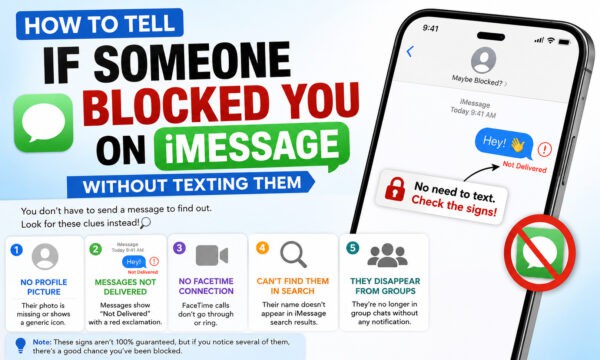
If you send someone a message on iMessage and it just sits there under “Delivered” that never appears, calls that ring once and drop straight to voicemail, and a contact photo that hasn’t changed in months, there’s a strong chance you’ve been blocked. None of these signs is proof on its own, since network issues, Do Not Disturb, and disabled iMessage can look identical. But when two or three line up at once, it’s about as close to confirmation as you’ll get without sending a message and asking outright.
The tricky part about iMessage is that Apple never tells the blocked person, and it never tells you either. There’s no banner, no error, no “this user has blocked you” message. Instead, blocking quietly changes how your phone behaves around that one contact, and those small behavioral shifts are really the only evidence you have to work with. Below is a rundown of what to check, what each sign actually means, and what it doesn’t.
Can You Know for Sure If Someone Blocked You on iMessage?
The short answer is no.
Apple intentionally protects user privacy. If someone blocks your number, Apple doesn’t notify you or display any message saying you’ve been blocked.
Because of this privacy design, the only way to make an educated guess is to observe changes in communication patterns across Apple’s services.
Keep in mind that many of these signs can also happen if the other person:
- Turned off their phone
- Switched to Android
- Disabled iMessage
- Changed their phone number
- Enabled Focus Mode
- Lost internet connectivity
- Is simply ignoring messages
For that reason, never rely on just one clue.
7 Signs You’ve Been Blocked on iMessage
1. Your Message Never Shows “Delivered”
Normally, when you send an iMessage (the bubble is blue), the word “Delivered” appears in small gray text underneath it within a few seconds, confirming the message reached the other person’s device. If you send a message and that word never shows up, even after you’ve confirmed you have a solid signal, that’s one of the clearest signals of a block. Apple’s servers still accept the message on your end, but it’s never actually routed to the recipient, so there’s nothing to trigger a delivery confirmation.
Caveat: this also happens if the other person has turned off iMessage entirely, switched to an Android phone, has no signal, or simply has their phone off. It’s also normal to occasionally not see “Delivered” even on unblocked contacts if they’ve disabled read/delivery receipts for everyone. Treat this as a clue, not a verdict.
2. Calls Go Straight to Voicemail (Often After One Ring)
This is probably the most talked-about “tell” in blocking folklore, and there’s some truth to it. When a number is blocked on iOS, calls to that contact are typically routed directly to voicemail, sometimes with a single half-ring before it happens. Because the call barely rings before dropping to voicemail, it can feel distinctly different from a normal unanswered call, which usually rings several times first.
Caveat: Do Not Disturb, Airplane Mode, a dead battery, or the person simply declining the call can all produce the exact same one-ring-then-voicemail pattern. This sign is more convincing when paired with the delivery issue above than when it stands alone.
3. Their Profile Photo and Name Info Freeze or Disappear
If the person has Name & Photo Sharing turned on, their profile photo and display name normally update automatically across your Messages app whenever they change it. If you previously saw their photo change over time and it suddenly stops updating, or the photo and name vanish from the conversation entirely and revert to just a phone number, that’s a sign your access to their shared contact info has been cut off, which happens when you’re blocked.
Caveat: this only works as a signal if the person had Name & Photo Sharing enabled with you in the first place. Plenty of people never turn this feature on, so its absence tells you nothing.
4. FaceTime Requests Don’t Go Through
Try a FaceTime call instead of a regular call. On an unblocked contact, you’ll typically see the call ring, then either connect or show as “Declined.” If you’re blocked, the call usually just ends abruptly with no ring and no status update at all, almost as if the request evaporated. Since FaceTime uses a separate connection process from standard cellular calls, it can sometimes reveal a block even when a regular phone call is ambiguous.
5. “Send as Text Message” Never Appears as an Option
Under normal circumstances, if an iMessage fails to send, your iPhone offers a fallback option to “Send as Text Message” over SMS instead. If you’re blocked, that fallback option frequently never appears at all, because the failure isn’t a delivery problem your phone is aware of, it’s a silent block your phone can’t detect. The message just stays sitting there, neither delivered nor flagged as failed.
6. Shared Content Quietly Stops Updating
If you previously shared anything through Apple’s ecosystem, a Find My location, a Shared Album, or a group chat, a block can sever those connections too. Watch for a Find My location that freezes on an old spot and never refreshes, a Shared Album that stops accepting your new photos, or being silently dropped from a group chat where your messages no longer seem to reach anyone else. These are more indirect, but they’re evidence you can gather without contacting the person at all.
7. Ask a Mutual Friend to Check for You
This one’s a workaround rather than a technical sign: have a friend who’s also in contact with the person send them a message and casually mention your name, or simply ask them to check whether the person has mentioned you being blocked. It’s not something you’re doing yourself, so it fits the spirit of confirming the block without reaching out directly, and a trusted third party is often the fastest way to get a real answer.
How to See Recently Deleted Apps On iPhone and Android
How to Confirm Without Contacting Them Directly
No single sign above is conclusive, since nearly all of them have an innocent explanation. The most reliable approach is to stack two or three signs together and see how they line up. A stuck “Delivered” status combined with calls dropping straight to voicemail is a much stronger indicator than either one alone. Use the table below to weigh how much confidence each sign should actually give you.
| Sign | Could Also Mean | How Confident This Makes You |
| No “Delivered” status | iMessage disabled, no signal, phone off | Moderate on its own; strong when paired with another sign |
| One ring then voicemail | Do Not Disturb, dead battery, declined call | Weak alone; moderate when combined with a stuck delivery status |
| Frozen profile photo/name | Photo sharing was never enabled | Moderate, only if sharing was previously active |
| FaceTime ends with no ring | Poor connection, FaceTime disabled | Moderate |
| No “Send as Text Message” option | Rare, but possible with certain carrier issues | Strong |
| Shared content stops updating | They turned off sharing manually | Moderate |
What Blocking Does NOT Do (Common Myths)
- It does not notify the blocked person in any way. There’s no alert, no pop-up, and no message telling them they’ve been blocked.
- It does not delete your old message history. Past conversations with that contact typically remain visible in your Messages app exactly as they were.
- It does not affect other apps or platforms. Being blocked on iMessage has no bearing on WhatsApp, Instagram, email, or any other way you might reach that person, unless they’ve blocked you there separately too.
What Does A Cancelled Call Mean? A Detailed Guide!
FAQ
Does a blocked message still say “Delivered”?
No. When you’re blocked, your message is typically sent but never marked as delivered, since it never actually reaches the recipient’s device. The status area under the message usually stays blank indefinitely.
Can you tell if someone blocked you by calling them?
It’s a decent clue but not definitive. Calls to a blocked number commonly go straight to voicemail after a single ring, but the same pattern can happen with Do Not Disturb enabled, a dead phone, or a call the person simply declined.
Does iMessage say “Not Delivered” when you’re blocked?
Usually not. A block tends to produce silence rather than an explicit failure message. An outright “Not Delivered” error is more often a sign of a genuine network problem than a block.
Can changing your number get around a block?
Messaging from a new number that isn’t blocked would go through normally, since the block is tied to the specific number or Apple ID that was blocked. That said, using a workaround to reach someone who has deliberately blocked you is worth thinking twice about, since the block was a clear signal they didn’t want to be contacted.
Did You Know?
Blocking someone on iMessage is device-wide rather than app-specific. It simultaneously blocks their texts, iMessages, calls, and FaceTime requests from that number or Apple ID, unlike apps such as Instagram or WhatsApp, where blocking only affects that one platform.
The Bottom Line
None of these signs come with a guarantee attached, since Apple designed blocking to be quiet by nature. The strongest approach is to look for two or three overlapping signs rather than betting everything on one. And if the evidence really does point to a block, it’s worth remembering that it was a deliberate choice on the other person’s end, so respecting that boundary, rather than working around it, is usually the better move.