 Gearfuse Technology, Science, Culture & More
Anyone who has spent time on Snapchat has asked the same question at some point: what actually moves that number under your username? Snapchat calls it a “super-secret” equation, and the company has never published the exact formula. But between Snapchat’s own support documentation and years of testing by its user base, a fairly clear picture has emerged of what counts, what doesn’t, and why the number sometimes seems to freeze for no reason. This guide breaks all of that down.
What Is a Snap Score?
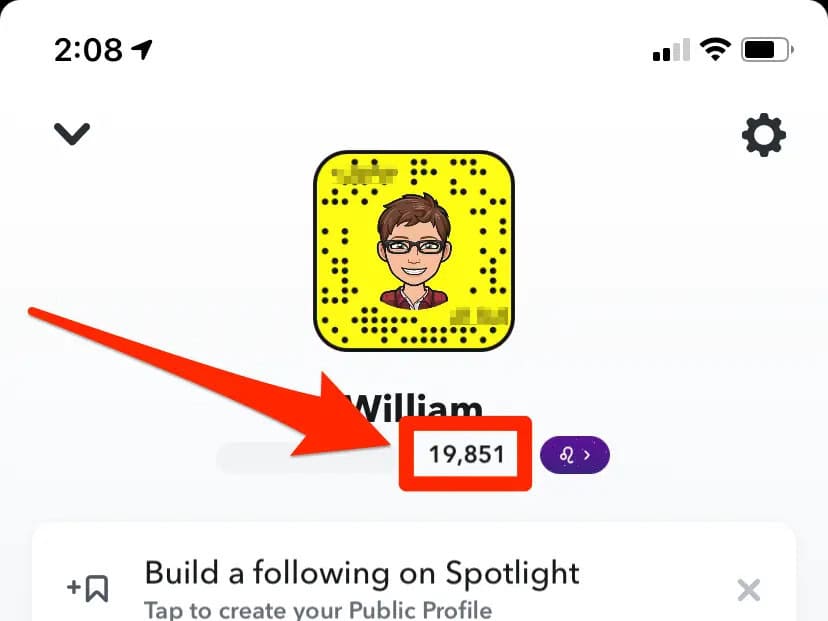
A Snap Score is the running total displayed directly beneath a user’s display name on their Snapchat profile. It is a cumulative measure of activity on the app rather than a popularity ranking or follower count. Unlike metrics on other platforms that can rise and fall, Snapchat has confirmed there is no way to lower or reset a Snapscore once it has gone up — it only ever increases.
For most users, the score functions less like a technical metric and more like an informal signal of how active someone is on the app. Friends compare scores casually, treat higher numbers as a marker of frequent use, and some chase specific milestones the way they might chase a step count or a game achievement.
Snapchat Planets: Understanding the Friend Solar System on Snapchat
How Snap Score Is Actually Calculated
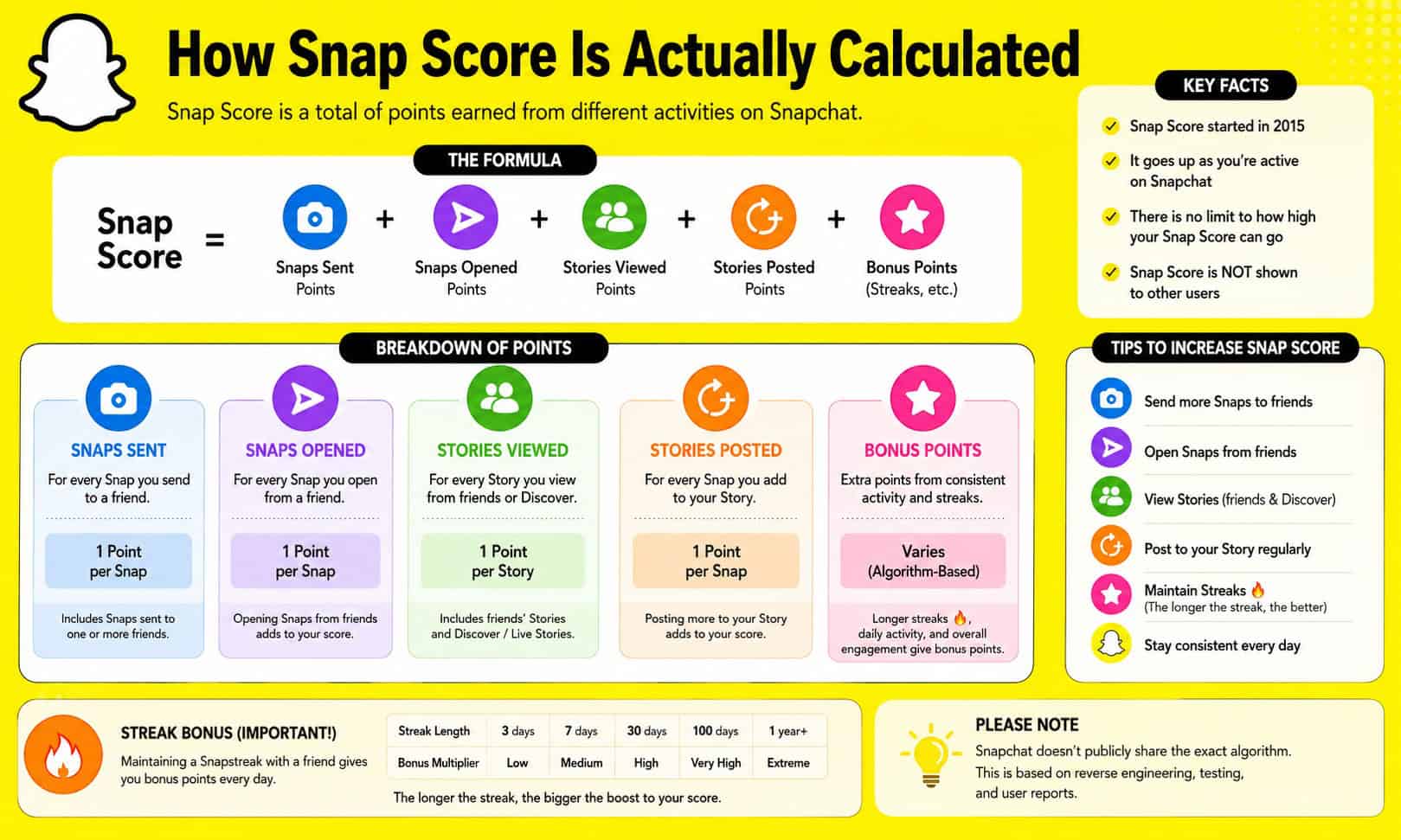
Snapchat’s own support page states that the score is determined by “a super-secret, special equation that combines the number of Snaps you’ve sent and received, the Stories you’ve posted, and a couple other factors.” The company has never gone further than that, and it does not publish exact point values.
That said, years of consistent testing by the Snapchat community have produced a widely observed pattern that lines up with how the score behaves in practice:
- Sending a Snap typically adds roughly one point.
- Opening a Snap you’ve received typically adds roughly one point.
- Posting a Story adds a smaller boost than a direct Snap.
- Maintaining a Snap Streak doesn’t appear to add a separate bonus on its own, but it forces at least one Snap exchange per day per streak, which compounds the total over time.
It’s worth being precise about group Snaps, since this is one of the most commonly misunderstood parts of the system. Snapchat has clarified that sending a Snap to a group counts as a single point for the sender, not one point per recipient in the group. The same applies on the receiving side — opening a group Snap counts once, regardless of how many people are in that group. This rule exists specifically to prevent users from inflating their score by mass-sending identical content to large group chats.
Because none of this is officially confirmed down to the decimal, it’s more accurate to describe these as observed patterns rather than a documented formula. Snapchat has been consistent in stating that additional undisclosed factors are part of the calculation as well.
What Does IDEK Mean On Snapchat
What Does NOT Affect Your Score
A large share of the confusion around Snap Score comes from users assuming any activity on the app should move the number. In practice, several common actions have no effect at all:
- Text messages sent through Chat — confirmed by Snapchat to have zero impact.
- Voice or video calls made through the app.
- Viewing other people’s Stories or content in Discover.
- Simply opening the app without sending or receiving any Snaps.
The single most common mistake people make when trying to raise their score is substituting text conversations for Snaps. Since only photo or video Snaps count, switching everyday back-and-forth conversations into Snap format is the most direct way to see the number move.
Snapchat+ Score Multiplier
Snapchat+ subscribers have access to a Snap Score multiplier, which speeds up score growth when both people in a conversation are Premium subscribers. The feature can be toggled from Snapchat+ Settings under Snap Score Booster. Some users have reported the multiplier’s effect increasing over the past couple of years, though Snapchat has not published an official rate, so any specific multiplier figure circulating online should be treated as a community-reported estimate rather than a confirmed number.
Snapchat+ subscribers also get access to a Score Change tracker, which shows how much a friend’s score has increased since it was last checked — useful for anyone trying to gauge a friend’s recent activity level rather than just their lifetime total.
WYF Meaning in Text, Snapchat, Instagram: Explained with Examples
Why Your Score Isn’t Updating
A frozen or slow-moving Snap Score is rarely a sign that something is broken. Snapchat processes score updates in batches rather than in real time, so a delay of a few minutes to a couple of days after sending or receiving a Snap is considered normal behavior. A handful of other causes are worth ruling out if the number seems stuck for longer than that:
- Weak or unstable internet connectivity preventing the app from syncing.
- An outdated app version or a temporary bug.
- A stale cached score being displayed even though the real number has updated in Snapchat’s system.
- In rare cases, an account flagged for unusual activity, which can temporarily pause score updates.
If the score genuinely appears stuck, the standard troubleshooting sequence is to force-close and reopen the app, toggle airplane mode on and off to force a reconnection, confirm the app is updated to the latest version, and log out and back in. If none of that resolves it, contacting Snapchat Support directly is the next step.
How to Check Your Snap Score
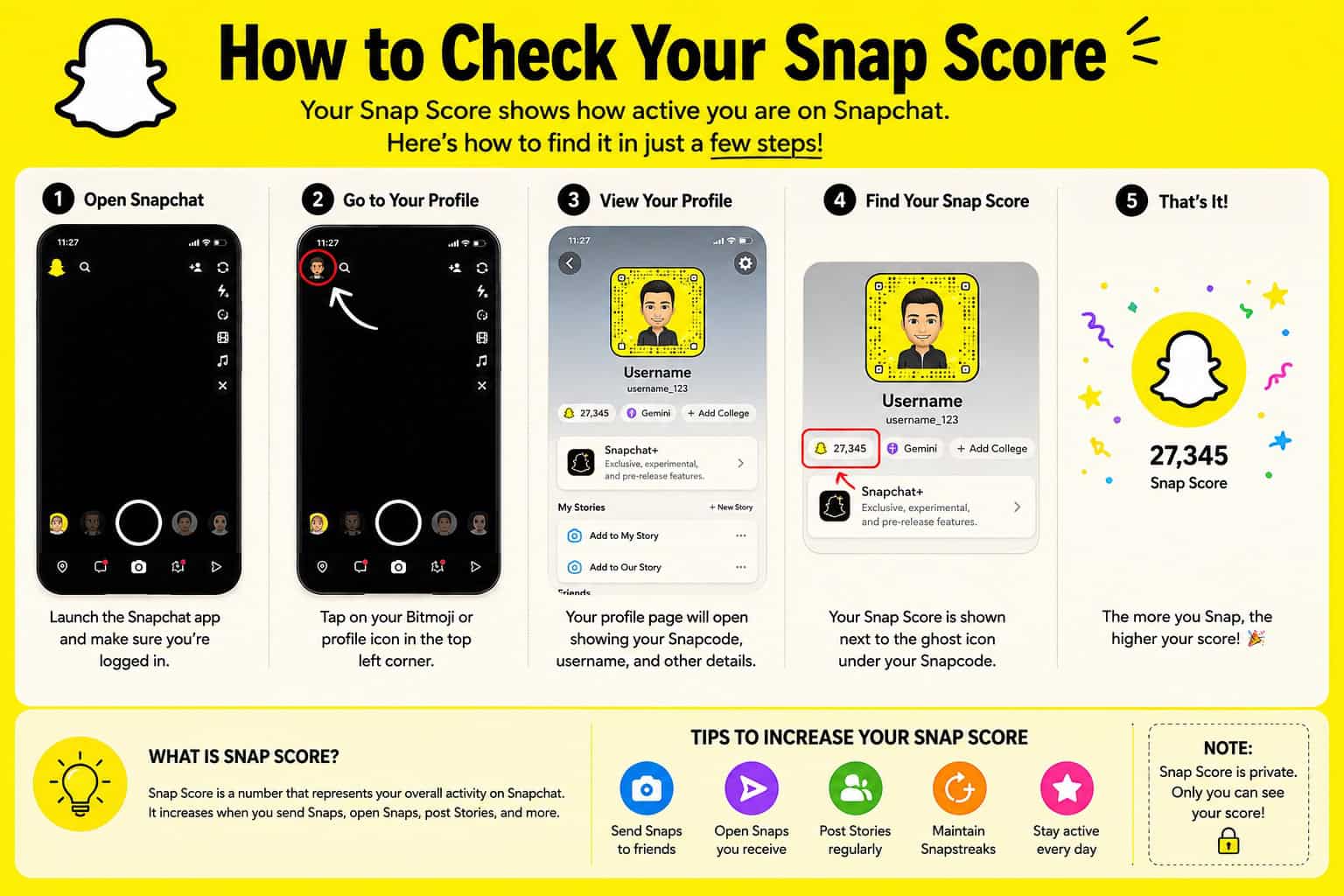
Finding a Snap Score takes only a few taps:
- Open Snapchat and tap the Bitmoji or profile icon in the top-left corner.
- The score appears directly beneath the display name on the Profile screen.
- Tapping the number brings up a breakdown of total Snaps sent and received.
One limitation to keep in mind: a Snap Score is only visible to mutual friends. If a score isn’t showing up for someone, it usually means they haven’t added the viewer back, or their profile visibility settings are restricting it.
Common Snap Score Myths, Debunked
A few persistent myths continue to circulate despite being repeatedly disproven by both Snapchat’s own statements and user testing:
- “Leaving Snaps unopened boosts your score.” False — points are only credited once a Snap is actually opened, not simply delivered.
- “Mass-sending the same Snap to your entire friend list multiplies your score endlessly.” Not accurate — identical Snaps blasted to many recipients tend to have limited impact and can even trigger spam-related flags on the account.
- “Third-party Snap Score boosting services are a safe shortcut.” These violate Snapchat’s Terms of Service and can result in a permanent suspension. The only way to reliably grow a Snap Score is through genuine use of the app.
What Does “IFK” Mean on Snapchat?
Frequently Asked Questions
Does texting increase Snap Score?
No. Text messages, voice notes, and stickers sent through Chat do not add to a Snap Score under any circumstances. Only photo and video Snaps count.
Can your Snap Score go down?
No. Snapchat has confirmed that a Snapscore is cumulative and cannot decrease or be reset once it has increased.
How many points do you get per Snap?
Based on extensive community testing, sending or opening a Snap typically adds about one point each. Snapchat+ subscribers may see faster growth through the Score Booster multiplier when messaging other Premium subscribers.
How long does it take for Snap Score to update?
Updates are usually processed within minutes, but delays of anywhere from a few hours up to 48 hours are considered normal, since Snapchat updates scores in batches rather than instantly.
Is Snap Score the same as followers or reach?
No. It has no connection to visibility, reach, or follower counts on the platform. It functions purely as a personal activity counter and, at higher milestones, can unlock cosmetic Trophy badges on a profile.