 Gearfuse Technology, Science, Culture & More
Losing critical data can occur at any moment. It may happen because of an accidental click, a bad hard drive, the failure of an update process for Windows, or a virus attack that leads to data disappearance. For students, businesspeople, photographers, or other office users, it might become very stressful because of lost documents, photos, videos, and project files.
Nevertheless, lost data does not mean it disappeared entirely. In fact, it might still be on the storage media until it gets overwritten by another one. Therefore, having quality recovery software proves to be important. They allow users to find and restore all possible recoverable data without possessing special technical skills.
At the same time, each type of data recovery software is not equal. Some of them are good in recovering accidentally deleted data, and some can help recover formatted drives, partitions, and even inaccessible storage media.
In order to choose the right solution, we have reviewed five of the most reputable data recovery software. Every piece of software has been analyzed taking into consideration their recovery abilities, supported storage media, ease of use, and actual recovery cases.
Why You Need Data Recovery Software
A good file recovery software can recover data from various situations including:
- Accidental file deletion
- Formatted hard drives or SSDs
- Corrupted storage devices
- Lost or deleted partitions
- Virus or ransomware damage
- System crashes
- RAW drives
- External drive failures
- Memory card corruption
The sooner recovery begins, the higher the chance of restoring your data successfully.
1. Stellar Data Recovery Professional for Windows
As far as reliable professional recovery software is concerned, Stellar Data Recovery Professional for Windows emerges as one of the best options out there.
This software helps in retrieving lost, deleted, formatted, and inaccessible files on all types of Windows storage devices. If your drive has turned out to be inaccessible, if your partition got missing, or you have accidentally deleted some essential documents, Stellar offers an easy recovery with high precision.
It proved very successful in recovering data from formatted SSDs, deleted partitions, USB drive, and corrupted external hard disks with folder preservation during the test process. Also, Stellar was able to detect drives marked as RAW by Windows for file recovery without any repair procedure.
What makes Stellar a preferred choice for professionals is that it helps in recovering hundreds of various file formats, including documents, pictures, movies, emails, archives, and multimedia files.
The software supports recovery from:
- Internal HDDs
- SSDs
- External hard drives
- USB flash drives
- SD cards
- BitLocker-encrypted drives
- Lost and Deleted partitions
Unlike many recovery tools that require complicated settings, Stellar keeps the recovery process simple.
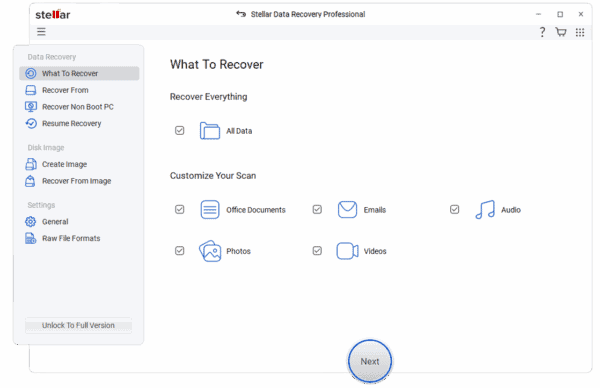
Step 1: Select the type of file you want to recover.
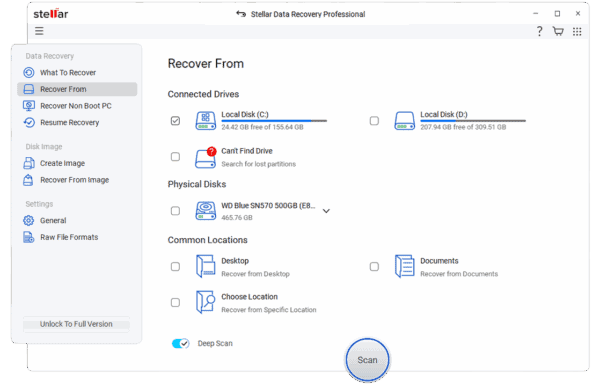
Step 2: Scan the storage device to find recoverable files.
Step 3: Preview the files and recover them to a safe location.
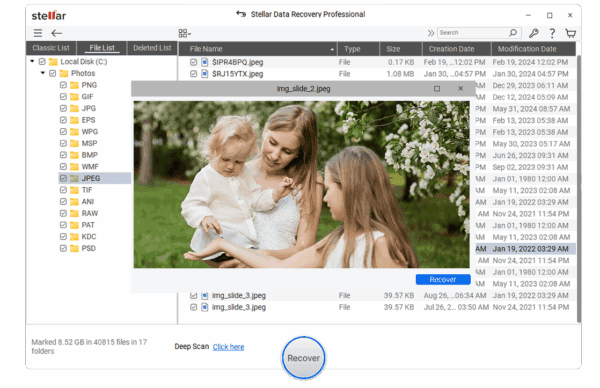
The preview feature allows the user to make sure of the files before the process of recovery starts. For users who require a one-stop solution to their data recovery needs, Stellar Data Recovery Professional for Windows is still among the best software options.
2. EaseUS Data Recovery Wizard
EaseUS Data Recovery Wizard has gained much popularity among Windows users due to its intuitive user interface and reliable recovery tool.
This program copes with all kinds of data losses such as lost data due to file deletion, partition formatting, inaccessible drives, and damaged devices.
EaseUS Data Recovery Wizard demonstrated very good results in restoring recently deleted files without disturbing the original folder structure. In addition, deep scans found files that were not detected during quick scans.
It works with:
- Hard drives
- SSDs
- USB flash drives
- Memory cards
- External storage devices
EaseUS software can work with several Windows File Systems, and that enables recovery from a broad range of storage media. If you desire quick recovery without dealing with complicated technical parameters, EaseUS is a good choice for you.
3. Disk Drill
Disk Drill does not just offer basic file recovery but also other disk monitoring and protection tools to help minimize the chances of losing your data in the future.
During testing, Disk Drill was able to successfully retrieve files such as documents, video files, compressed archives, and pictures that had been deleted from a partition.
Disk Drill uses a number of different scan levels in its recovery process, giving you the opportunity to restore recent deletions quickly and more complex ones slowly.
Disk Drill supports recovery from:
- Internal drives
- External hard drives
- USB devices
- Memory cards
- Digital cameras
This program is capable of recognizing hundreds of different file types, which makes it useful for personal and business users alike.
Moreover, it has a nice user interface and easy navigation.
4. Wondershare Recoverit
The software is highly reputable regarding its ability to retrieve multimedia files, especially video files.
When files are deleted, drives are formatted, or storage media becomes inaccessible, Recoverit scans through to find any possible recoverable data.
The software would be highly beneficial to people involved in creating contents such as photographers and video editors who need to recover their multimedia files.
Recoverit also retrieves data from:
- Crashed Windows systems
- External storage devices
- NAS storage
- Linux drives
- USB devices
Its advanced scan engine ensures that damaged areas on the storage media are well analyzed, ensuring successful retrieval of data.
Regarding multimedia recovery, Recoverit is highly dependable.
5. Recuva
Recuva is still considered one of the most widely used tools due to its light weight and simple interface.
Though it lacks all those advanced options of data recovery which are present in professional applications, this tool has proven to be quite effective in recovering deleted files not long ago.
While testing Recuva, we could recover documents, photos, and video files from working hard disks within a short period of time.
Moreover, the Deep Scan function helped to increase data recovery success from formatted storage media; however, data recovery from highly damaged storage media was not that successful as with premium recovery tools.
Recuva supports:
- Hard drives
- USB flash drives
- Memory cards
- FAT and NTFS file systems
For users who need a simple recovery solution for everyday file loss, Recuva remains a practical option.
How to Choose the Right Data Recovery Software
Before selecting recovery software, consider these important factors.
Recovery Performance
The software needs to consistently recover deleted, formatted, and inaccessible files.
Device Compatibility
Select software that works with HDDs, SSDs, USB drives, SD cards, and external storages.
Scan Quality
A combination of Quick Scan and Deep Scan leads to better results.
File Preview
Viewing the files before starting the process of recovery is helpful in verifying their successful restoration.
File Format Support
The greater number of file formats supported by the software, the more useful it is.
User Experience
User-friendly interface enables users to recover their data even without any technical skills.
Final Thoughts
Data loss without warning may affect both your private and work projects as well as hinder your efficiency on a daily basis. Thankfully, there are now ways of restoring lost files using recovery software despite such complications as formatting and disk partitioning.
EaseUS Data Recovery Wizard, Disk Drill, Wondershare Recoverit, and Recuva provide users with effective data recovery tools, but Stellar Data Recovery Professional for Windows is the most effective when it comes to user-friendly interface, high-quality scanning, and recovery performance on different storage devices.
Stellar offers reliable professional recovery software for recovering documents, pictures, videos, emails, archives, and even lost or inaccessible disk information.