 Gearfuse Technology, Science, Culture & More
Buying your child their first phone can feel daunting, but it’s become an expected milestone. In fact, according to Demandsage, “53% of children in the United States own a smartphone by the time they reach 11 years of age”.
Smartphones bring both risks and benefits, but with parental controls, kids can enjoy freedom while parents stay reassured.
In this guide, we’ll walk through everything you need to know about buying a smartphone and setting up parental controls for your child.

Buying your child a phone has tangible benefits, but also comes with possible risks. To easily evaluate the decision, here’s a list of pros and cons to consider:
| Pros | Cons |
| Smartphones are a vehicle for your children’s learning, with education apps and online resources | Screen addiction is real and can hinder growth |
| Allows you to keep track of your child’s location | Potentially visiting ‘unsafe’ sites with content not deemed safe for children |
| Facilitates communication with your child, in the event of emergencies, or to keep in touch when away | Inappropriate communication with friends or strangers |
| Provides a small ‘independence’ for them to engage with friends or family | Learning bad behaviors/habits from videos online |
| Learn tech skills early, which can be useful as they grow older |
This highlights some very real concerns that parents have, namely:
- Gaming addiction: Smartphones let kids play anywhere, anytime, which can lead to addiction to games like Roblox or Fortnite.
- Social Media Pressure: Social media often can have a negative effect on a child’s self-esteem; always chasing likes, or being conscious of their appearance.
- Cyberbullying: Messaging platforms and social media can expose kids to hurtful comments, leading to stress, anxiety, or depression.
- Online Predators: The most serious risk; children may overshare personal information or be targeted by dangerous strangers.
However, the reality is that in 2025, people are expected to have a smartphone to ‘live’. Buying a smartphone for your child should instead be seen as a learning experience, and is the perfect time to introduce and educate on digital safety rules.

Age and Needs
The first thing to consider is the age and requirements of your child. Depending on their age, they might need a different kind of device:
- Elementary School: A basic “dumb” phone with access to calls/text may be sufficient. Add strict controls and clear limits.
- Middle School: Entry-level or mid-range smartphones work well but need strict usage rules.
- High School: A mid-range or flagship device may be suitable, with more freedom as trust is earned.
Budget and Durability
Next, consider your budget and additional features like durability. Here are a few things to consider:
- Budget-Friendly: Kids don’t need premium flagships; a solid entry-level/mid-range phone is enough.
- Battery Life: Choose a phone with a long-lasting battery so you can always reach them or see their location.
- Durability: Younger kids drop things; opt for a durable or affordable-to-replace phone.
- Storage: Aim for 128GB or more to handle photos, music, and schoolwork.
Compatibility With Parental Controls
Lastly, you need to consider the smartphone’s compatibility with parental controls. Here are a few aspects from both OSes to consider:
- Android: You want finer control and flexibility. Android allows a larger selection of third-party control apps, giving you more control than iOS.
- iOS: You prefer the ecosystem (i.e., your child has an iPad, Apple Watch, Mac). iOS has the built-in ‘Screen Time’ mode to limit content, apps, and settings for your child’s device through Family Sharing. However, has some limitations to what you can control.
Alternatively, you might also be in a situation where you’re an Android user, but you bought your child an iPhone. In this case, there are no built-in solutions to set up parental controls. You could instead opt for third-party platforms like AirDroid Parental Controls to manage your child’s device.

Part 3. First Steps After Buying: Must-Do Safety Settings
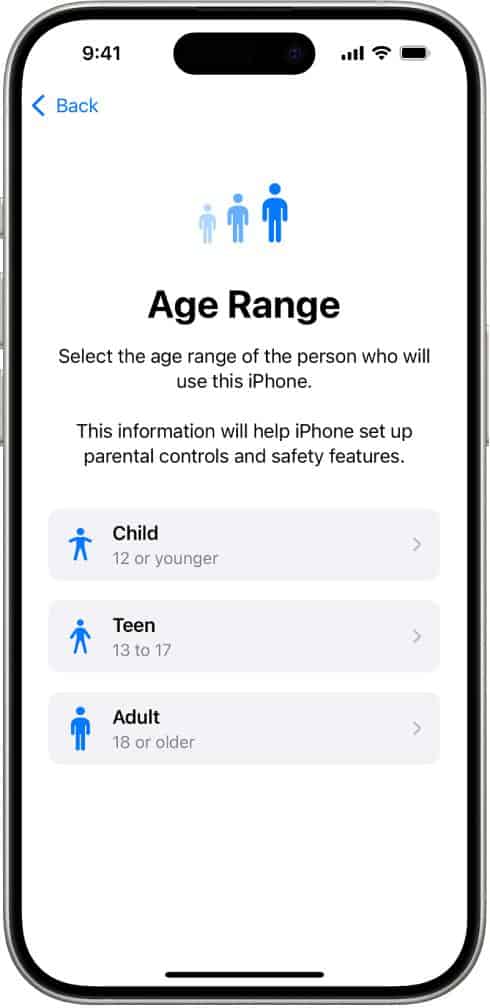
Don’t use your own personal account details for their new iOS/Android device. Instead, use ‘Google Family Link’ for Android and ‘Apple Family Sharing’ for iPhone when setting up their new device.
Here are guides for Google’s Family Link and Apple’s Family Sharing to get started.
This gives you control over purchases, downloads, and allows content restrictions.
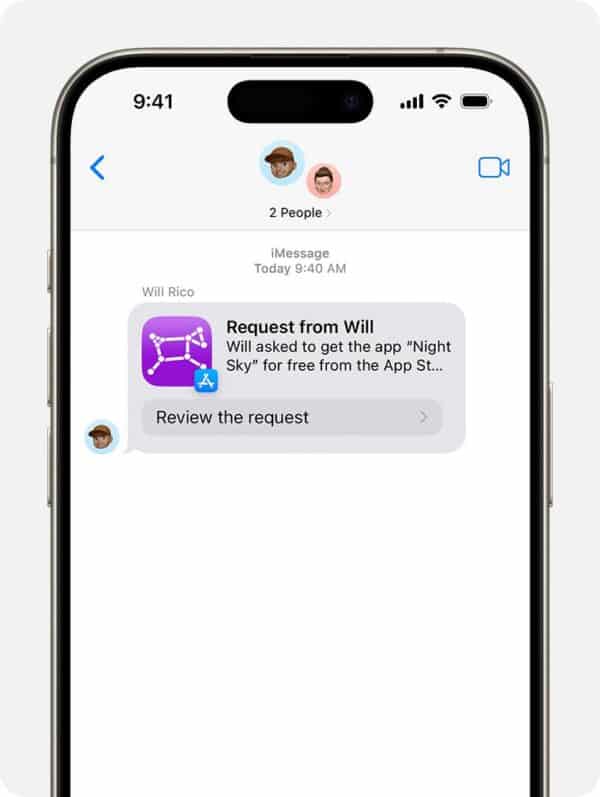
Both Android and iOS allow parents to set up parental approval before app downloads or in-app purchases. This helps you keep an eye on what apps your child is downloading, and prevents shocking credit card bills after your child goes on a spending spree in Roblox.
For example, with iPhones, you can enable ‘Ask to Buy’:
- Open Settings on your iPhone.
- Select ‘Family’.
- Select the ‘Child’s’ profile.
- Select ‘Tap to Buy’, and then enable ‘Ask to Buy’.
This sends you a notification when your child wants to download/purchase something on the App Store, allowing you to approve or deny it.
Lock Down Privacy Settings
Review your child’s privacy settings in new apps/services they use. This is to limit your child’s personal details availability to strangers, such as their phone number, location, photos, etc.
Depending on the apps they use, you can limit who can message/follow them, make accounts private, etc.
Set Up Screen Locks & Enable Location Services
Lastly, teach your child the importance of keeping their phone secure.
Help them set up a passcode, biometric sign-ins like fingerprints, or Face ID. Also, enable location sharing on your personal device. This makes it easy to track if the phone is lost or to check in during emergencies.
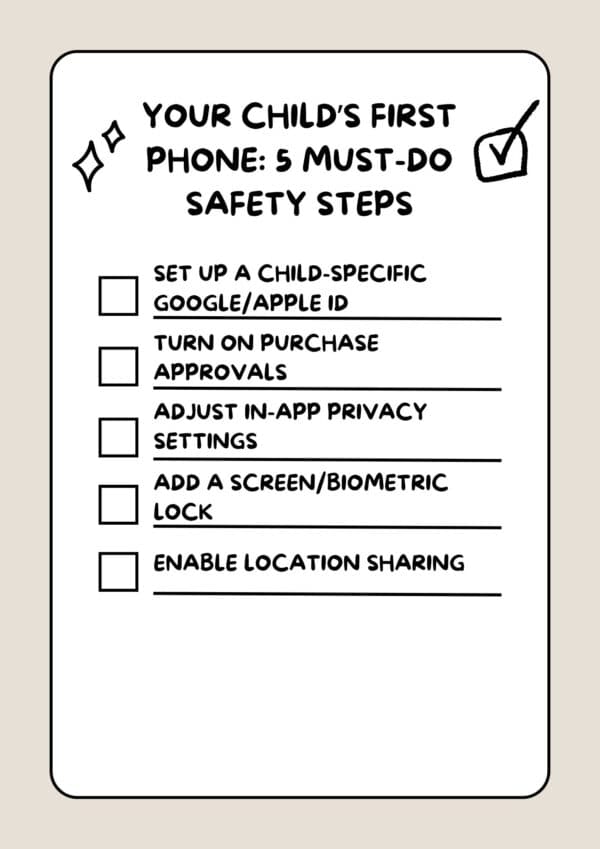
A Quick Checklist to Reference
Part 4. Setting Digital Ground Rules With Your Child
Aside from setting things up on your child’s phone, it’s important to establish ground rules for smartphone usage. This helps manage your child’s usage to ensure it is appropriate and not harming them:
Time Rules
Set boundaries on both how long and when your child can use their phone. For example:
- Limit total screen time to a set number of hours per day (e.g., 1–2 hours).
- Restrict usage during schoolwork, at bedtime, or right after waking up.
Too much unregulated screen time can lead to dependency and poor sleep habits, so consistency here is key.
Location Rules
Decide where phones are, and aren’t, allowed. Common examples include:
- No phones at the dinner table to encourage family interaction.
- No phones in bedrooms, where kids are more likely to overuse them late at night.
Studies show children with phones in their rooms tend to rack up significantly more screen time, so keeping devices in shared spaces can help regulate their usage.
App Rules
It’s equally important to set boundaries on what your child can do with their phone. App rules help ensure they only access age-appropriate content and avoid apps that might expose them to unsafe interactions. For example:
- Use parental approval for new app downloads.
- Only allowing age-appropriate games, social media platforms, and apps.
- Setting boundaries around messaging/video-sharing apps to reduce exposure to strangers.
An Effective Way to ‘Enforce’ Rules
This might seem restrictive, but this ensures your kids are using their smartphones wisely. To help reinforce the idea of digital well-being, consider drafting a Family Digital Contract.
Family Digital Contracts are a great way to visualize what rules you’ve agreed on and provide your child with a sense of responsibility to use their device wisely. This provides an open space to discuss device usage and establish healthy boundaries regarding screen time and online behavior.
Both parents and child should sign the Family Digital Contract to foster a sense of togetherness and communication of device usage as they grow older.
While built-in Android/iOS solutions are comprehensive, they’re not as feature-packed as third-party apps like AirDroid Parental Control. It provides a whole host of additional features to help manage your child’s smartphone and tablet usage.
Here’s a quick rundown why we recommend this tool:
- One-Way Video/Audio Access: If you haven’t heard back from your child and are worried, you can instantly access their camera/mic to observe their surroundings and ensure their safety.
- Instant Alerts for NSFW Content: Monitor select apps or keywords like “Sex” or “Nude”, getting instant alerts on your phone when the specified filters are applied. This works across social media, the Photos app, messaging platforms, and more.
- Screen-time & App Usage Monitoring: Take a comprehensive look at your child’s daily or weekly screen-time usage, and monitor the apps they use. Limit inappropriate apps/websites, and scheduled downtimes to reinforce healthy habits.
- Comprehensive Location Tracking: Real-time GPS location tracking, route history and geofencing to create ‘boundaries’, alerting you to when your child enters or exits specified zones like schools or parks
AirDroid Parental Control empowers parents to ensure their child’s safety both online and offline. Click the link here to learn more!
Part 6. Long-Term Habits and Parent-Child Communication
That said, while apps and settings can help manage your child’s smartphone usage, in the long term, open communication is integral. If your child feels that they’re being tightly monitored, this might lead to them shutting off from you completely.
Conversations Are More Important
Explain openly why you’ve put certain systems in place, whether it’s screen limits, app approvals, or privacy restrictions. When kids understand that rules are meant to protect them rather than punish them, they’re more likely to follow them willingly.
Encourage your child to share their thoughts and questions without fear of “getting in trouble.” For example:
- If they accidentally click on an inappropriate site, they should feel safe telling you.
- If they’re confused or worried about something they’ve seen online, they should know they can ask you for clarity.
Gradually Loosen Restrictions
Initially, keep a close eye on everything your child does on their phone. However, over time and plenty of conversations, loosen up the restrictions slowly as they grow older.
This encourages self-discipline and teaches them to make safe choices without constant oversight.
For example, you could eventually extend daily screen time limits, allow them to install specific apps without approval, or give them privacy when messaging with friends.
Tie these newfound freedoms to your ongoing conversations, framing them as a step toward independence. Show them that you trust them based on their good judgment, building confidence, and reinforcing digital responsibility.
Scheduled Check-ins
That said, it’s still healthy to regularly monitor and have check-ins, weekly or monthly, to review device use. This keeps communication open and shows your child that while they have more freedom, responsibility still comes with accountability.
Use these check-ins to talk through what they’re watching, who they’re messaging, and how much time they’re spending online. If concerning patterns emerge, you can step in with extra guidance or adjust the rules as needed, but always explain the why behind any changes.

Conclusion
A child’s first phone is more than just a gadget; it’s a step toward independence. It’s also a chance to show responsibility, helping them make informed, smart choices as they grow older.
In our opinion, it’s recommended to buy a smartphone (rather than a dumb phone) and set parental controls to keep them safe.
They’re at an age where friends are already getting their first phones, so now’s your chance to guide them toward healthy digital habits that will last a lifetime.


