Gearfuse Technology, Science, Culture & More
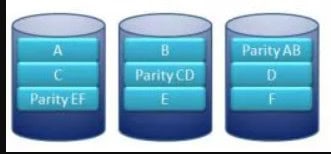
RAID systems keep your data safe when drives fail. The secret? Data parity—a method that lets your array rebuild lost information from the remaining drives.
What is Data Parity?
Data parity is a computational technique that checks for data losses and errors during transmission between storage devices. When data moves from one location to another, a parity bit gets added to the dataset. This bit contains checksums that verify data accuracy on the receiving end.
RAID 5 and RAID 6 use distributed parity for fault tolerance and data redundancy. RAID 5 survives one disk failure. RAID 6 survives two. Without parity, a single drive failure means losing everything.
How Parity Works in Different RAID Configurations
Parity is calculated and stored either on a dedicated disk or distributed across drives in the array. Standard RAID levels implement parity differently:
RAID 3 and RAID 4 stripe data across member drives and store parity on a single dedicated drive. This creates a bottleneck at the parity drive.
RAID 5 requires at least three drives. It stripes data and distributes parity across all member drives using XOR calculations. This balanced approach provides both performance and fault tolerance for one drive failure.
RAID 6 works like RAID 5 but adds a second parity block. This double-distributed parity protects against two simultaneous drive failures, though setup and recovery become more complex.
Parity Distribution Types
Depending on the RAID controller, the purpose of the RAID, and other factors, users can set up the drives as needed. They can also pick the parity distribution type to make things simpler and keep I/O performance efficient.
RAID controllers support four parity distribution methods:
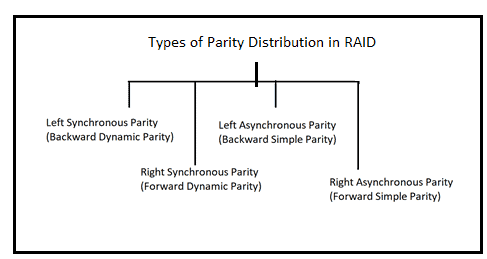
- Left Synchronous Parity (Backward Dynamic Parity)
- Right Synchronous Parity (Forward Dynamic Parity)
- Left Asynchronous Parity (Backward Simple Parity)
- Right Asynchronous Parity (Forward Simple Parity)
Each affects I/O performance differently based on your workload.
How RAID 5 Calculates Parity Using XOR
RAID 5 uses XOR (Exclusive OR) operations to calculate parity. XOR is a Boolean operation that works with binary data:
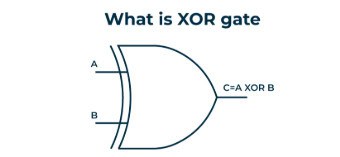
- Different inputs = output of 1
- Same inputs = output of 0
Here’s an example with a four-drive RAID 5 array. The first three drives store these bits:
| Drive 1 | Drive 2 | Drive 3 |
| 0 | 0 | 0 |
| 0 | 1 | 0 |
| 0 | 0 | 1 |
XOR calculation produces the parity:
| Drive 1 | Drive 2 | Drive 3 | Parity |
| 0 | 0 | 0 | 0 |
| 0 | 1 | 0 | 1 |
| 0 | 0 | 1 | 1 |
If Drive 3 fails, you run XOR on the remaining drives and parity to rebuild the lost data:
| Drive 1 | Drive 2 | Parity | Drive 3 (Rebuilt) |
| 0 | 0 | 0 | 0 |
| 0 | 1 | 1 | 0 |
| 0 | 0 | 1 | 1 |
Real RAID arrays process millions of bits based on strip size, but the principle stays the same.
RAID 6 Parity: Adding Reed-Solomon Codes
RAID 6 needs at least four drives and uses two parity blocks for two-drive fault tolerance.
The first parity block uses XOR operations like RAID 5. The second uses Reed-Solomon Codes—complex mathematical operations involving Vandermonde matrices, Gaussian Elimination, and Galois Field arithmetic. This combination provides stronger protection but requires more processing power.
Here is a table showing the parity calculation and other details of RAID 5 and RAID 6 arrays:
| Type of RAID Configuration | Min. No. of Drives Required | Type of Parity | Fault Tolerance | Parity Calculation Method |
| RAID 5 | 3 | Single distributed | 1 drive failure | XOR logic gate |
| RAID 6 | 4 | Double-distributed | 2 drive failure | XOR logic gate + RS code |
When RAID Arrays Fail
Fault tolerance has limits. If failures stay within the permissible range, you can hot-swap the failed drive and rebuild the array. But problems occur:
Multiple drive failures during rebuild halt the recovery process. Always check the health of other drives before starting a rebuild.
Power failures or surges during rebuild corrupt RAID configuration and cause data loss.
Rebuild times for large arrays can take days. Your data remains vulnerable during this period.
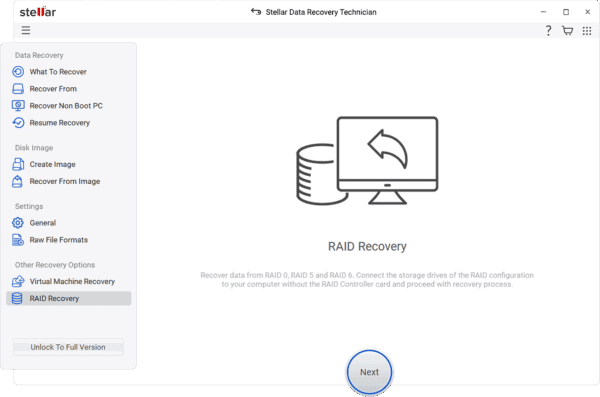
Specialized RAID data recovery software handles these situations. Tools like Stellar Data Recovery Technician recover data from failed RAID 0, 5, 6, or hybrid arrays. The software scans member drives, creates virtual images based on RAID parameters, and recovers data without a full rebuild. Built-in drive monitoring verifies member drive health before recovery.
Key Takeaways
Data parity protects RAID 5 and RAID 6 arrays against drive failures through mathematical redundancy. XOR operations in RAID 5 and combined XOR with Reed-Solomon Codes in RAID 6 enable data reconstruction when drives fail.
Parity-based RAID isn’t a backup solution. Rebuild processes carry risks—from simultaneous failures to power interruptions. Understanding parity mechanics helps you implement better data protection strategies and respond effectively when drives fail.