 Gearfuse Technology, Science, Culture & More
Every month, millions of people search for a way to turn a YouTube video into an MP3 file. The intent is usually simple: save a song, a lecture, or a podcast clip for offline listening. What most people don’t realize is that the legality of doing this depends far more on the content and the source than on the tool used to convert it.
This guide breaks down what’s actually legal when converting YouTube videos to MP3 in 2026, walks through a simple five-step process for staying on the right side of copyright law, and reviews the safest free tools for legitimate use cases — including your own uploads, Creative Commons content, and royalty-free libraries.
Is Converting YouTube to MP3 Legal?
The honest answer is: it depends on what you’re converting and how you plan to use it.
YouTube’s Terms of Service prohibit downloading any part of the service unless YouTube itself provides a download button or offline option, such as through YouTube Premium. Separately, copyright law protects almost everything uploaded to the platform. Official music videos, film clips, and monetized content stay protected regardless of whether a conversion tool makes the process technically easy.
That said, there are clear situations where converting YouTube audio to MP3 is legal. Content you personally own or uploaded to your own channel is fair game, as is anything released under a Creative Commons license or sitting in the public domain, such as very old recordings or government-produced media. Conversion is also fine when a creator explicitly states in their description that downloads are permitted, or when you’re using YouTube Premium or YouTube Music Premium’s built-in offline download feature rather than a third-party tool.
Copyright and fair use rules also vary by country. The U.S. fair use doctrine, the UK’s fair dealing provisions, and similar exceptions in the EU and India each treat personal, non-commercial use differently, so what’s a low-risk gray area in one jurisdiction may carry more legal weight in another. When in doubt, the safest approach is to only convert content you have clear rights to use.
10 Free Offline Music Apps for Android/iOS
Step-by-Step: How to Convert YouTube to MP3 Legally
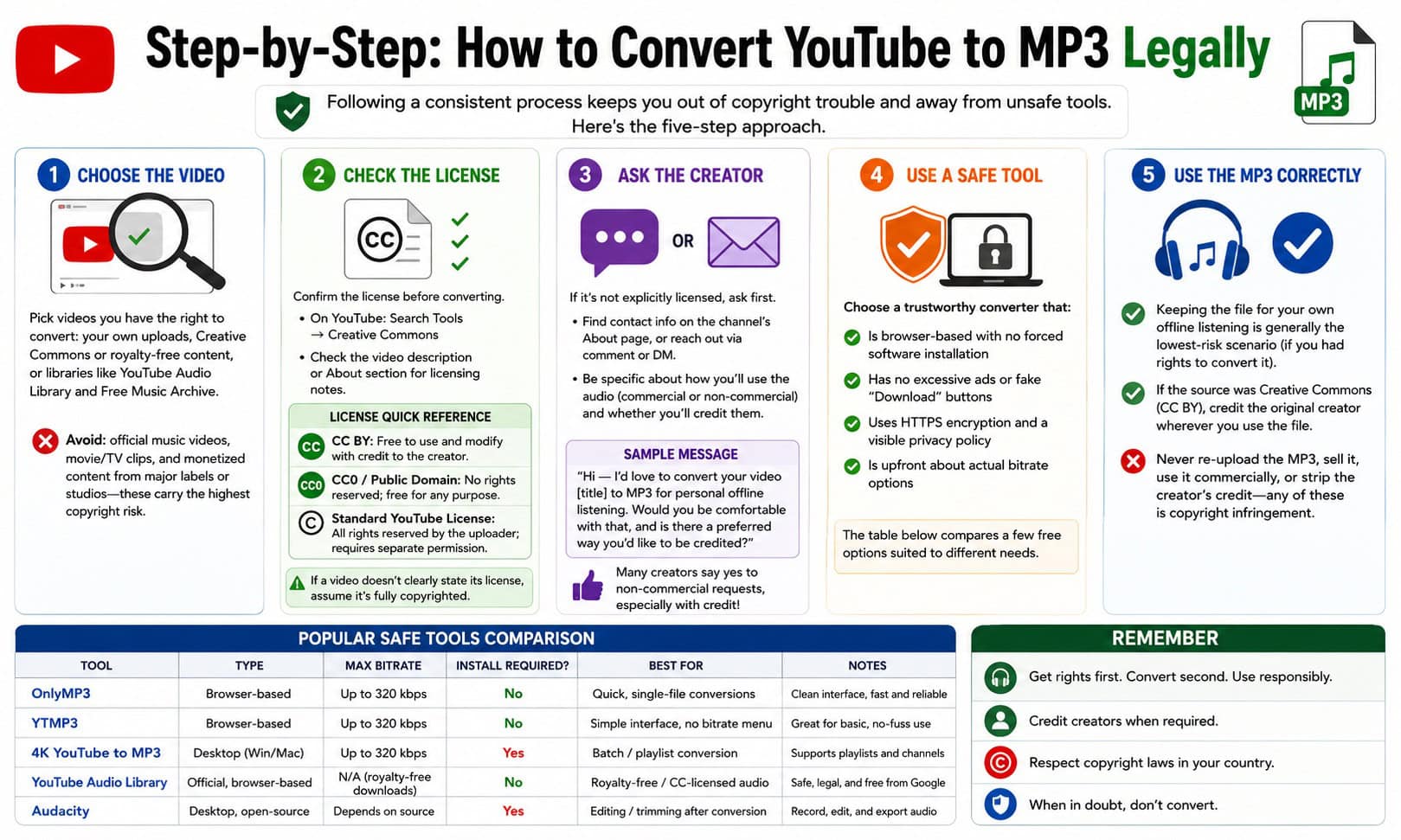
Following a consistent process keeps you out of copyright trouble and away from unsafe tools. Here’s the five-step approach.
Step 1: Choose the Video
Start by picking a video you actually have the right to convert. In practice, that means favoring your own uploads or original recordings, videos explicitly labeled as Creative Commons or royalty-free, and content pulled from libraries built for reuse, such as the YouTube Audio Library or Free Music Archive. Steer clear of official music videos, movie or TV clips, and monetized content from major labels or studios, since these carry the highest copyright risk no matter which tool you use to convert them.
Step 2: Check the License
Before converting, confirm what license the video actually carries. On YouTube, you can filter search results by usage rights by going to Search Tools, then Creative Commons, after running a search. You can also check the video’s description or About section for licensing notes.
A quick reference for the licenses you’ll run into most often: CC BY content is free to use and modify as long as you credit the creator, CC0 or public domain content has no rights reserved and is free to use for any purpose, and the Standard YouTube License means all rights stay with the uploader, so downloading requires separate permission. If a video doesn’t clearly state its license, the safest assumption is that it’s fully copyrighted.
Step 3: Ask the Creator
If a video isn’t explicitly licensed for reuse but you’d still like to convert it, the safest route is to ask. Most creators list contact information on their channel’s About page, or you can reach them through a comment or direct message.
When reaching out, be specific about what you plan to use the audio for, whether the use is commercial or non-commercial, and whether you’re willing to credit the creator. A simple outreach message might read: “Hi — I’d love to convert your video [title] to MP3 for personal offline listening. Would you be comfortable with that, and is there a preferred way you’d like to be credited?” Many creators say yes to non-commercial requests, especially when credit is offered.
Step 4: Use a Safe Tool
Once you’ve confirmed you have the right to convert a video, choose a tool that won’t put your device at risk. A trustworthy converter is typically browser-based with no forced software installation, free of excessive ads or fake “Download” buttons that redirect elsewhere, secured with HTTPS encryption and a visible privacy policy, and upfront about its actual bitrate options rather than making vague quality claims.
The table below compares a few free options suited to different needs. As with any third-party tool, only use these for content you have the rights to convert.
| Tool | Type | Max Bitrate | Install Required? | Best For |
| OnlyMP3 | Browser-based | Up to 320 kbps | No | Quick, single-file conversions |
| YTMP3 | Browser-based | Up to 320 kbps | No | Simple interface, no bitrate menu |
| 4K YouTube to MP3 | Desktop (Win/Mac) | Up to 320 kbps | Yes | Batch/playlist conversion |
| YouTube Audio Library | Official, browser-based | N/A (royalty-free downloads) | No | Royalty-free/CC-licensed audio |
| Audacity | Desktop, open-source | Depends on source | Yes | Editing/trimming after conversion |
Step 5: Use the MP3 Correctly
Converting the file legally is only half the equation — how you use the MP3 afterward matters just as much. Keeping the file for your own offline listening is generally the lowest-risk scenario, provided you had rights to convert it in the first place. If the source was Creative Commons (CC BY), credit the original creator wherever you use the file. What you should never do is re-upload the MP3 to another platform, sell it, use it commercially, or strip the original creator’s credit — any of these turn a gray-area personal download into clear copyright infringement.
5 Audio Tools that Will Drastically Improve Your Listening Experience
Best Free Tools for Legal Conversion in 2026
Beyond the tools already listed in Step 4, a few additional options are worth knowing about depending on your workflow. YouTube Premium and YouTube Music Premium remain the only fully official way to save YouTube audio offline, with no third-party tool required. The YouTube Audio Library is a built-in resource for royalty-free and Creative Commons music and sound effects, purpose-built for reuse, and the Free Music Archive offers a long-standing library of legally shareable, often Creative Commons-licensed audio. If you’re converting multiple videos from your own channel or a licensed playlist at once, a desktop batch converter will save considerable time over doing it one file at a time.
Whichever tool you choose, treat any online converter with the same caution you’d apply to any unfamiliar website: avoid downloads ending in .exe or .iso when you expected an MP3, ignore prompts to “update your player,” and don’t grant notification permissions.
FAQ
Is it illegal to convert YouTube videos to MP3 for personal use?
It depends on the content. Converting your own uploads, Creative Commons videos, or content with explicit permission is generally fine. Converting copyrighted music or monetized content without permission is a violation of both YouTube’s Terms of Service and copyright law, even if it’s only for personal use.
Can YouTube ban my account for using converters?
YouTube’s Terms of Service prohibit unauthorized downloading, and repeated violations can lead to account restrictions, though enforcement against individual personal-use downloads is inconsistent. The bigger risk is usually the copyright status of the content itself, not the account action.
What’s the best audio quality setting for MP3 conversion?
320 kbps is the highest common bitrate offered by most converters and is close to CD quality. For spoken content like podcasts or lectures, 128–192 kbps is usually sufficient and produces smaller files.
Are online converters safe to use?
Some are, some aren’t. Stick to browser-based tools with no forced installs, avoid sites with aggressive ads or unclear download buttons, and check recent user reviews before trusting a new site.
Do I need permission if the video has no copyright claim showing?
Yes. The absence of a visible copyright claim doesn’t mean a video is unlicensed — it may simply not have been flagged yet. Always check the license or ask the creator directly rather than assuming a lack of a claim means it’s free to use.
Conclusion
Converting YouTube videos to MP3 isn’t inherently illegal — but doing it legally means paying attention to the content’s license, not just finding a working tool. Stick to videos you own, Creative Commons content, or material you’ve gotten explicit permission to use, choose a converter that respects your privacy and security, and use the resulting file responsibly. Follow that process, and you can enjoy offline audio without the legal or security risks that come with the more careless approach most guides gloss over.